
Follow this worked strategy
I connected Claude.ai to the NexusTrade trading API and had it research a SPY bull call spread, build three explicit rules, and inspect the completed 2024 test. The agent operated this workflow through NexusTrade's MCP server; it did not build the integration. The spread returned 26.49% against full-capital SPY at 25.30%. This is a development test on examined dates. Judge frozen rules on dates you have not used yet.
Follow the full journey
Connect Claude.ai
Add the NexusTrade connector
https://nexustrade.io/api/mcpOpen the button below. If the form is not prefilled, use Customize → Connectors → + Add → Add custom connector. Name it NexusTrade, paste the server URL, then Continue. These steps are for an individual account; organization setup is below.
What you should see: The connector form shows NexusTrade and https://nexustrade.io/api/mcp. Opening this page alone does not connect your account.
Open Claude's connector form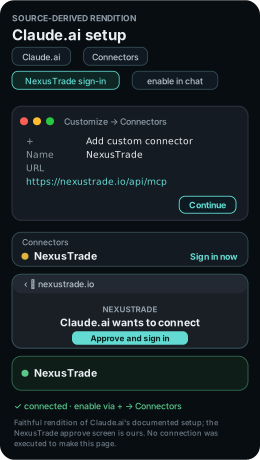
Sign in, then enable it in this chat
Review detected authentication, Continue, choose Sign in now and finish with Add. Complete NexusTrade sign-in. In a new Claude conversation, open + → Connectors and enable NexusTrade. Under Search and tools, leave only tools needed for this task enabled.
What you should see: NexusTrade appears in your connectors and is enabled for this conversation. Review the account selected during sign-in; do not paste a password or API key into the chat.
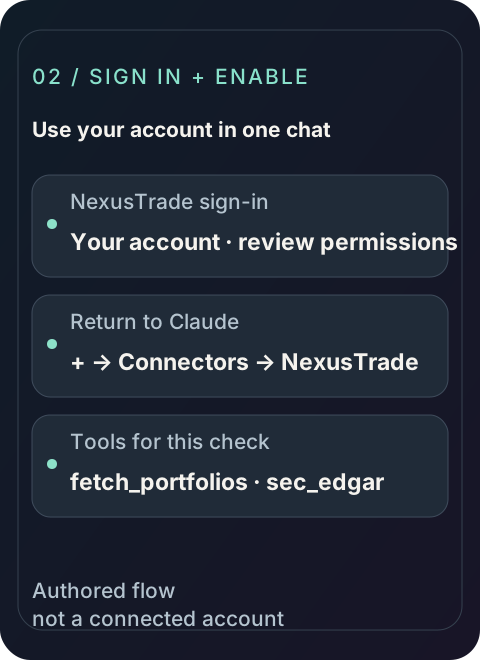
The result identifies Apple's company filing, filing date and source URL. The connection check makes no account changes.
Inspect the request
Research SPY and the call spread
Read the SPY underlying, option expiry and strike selectors together. The long and short call legs use the same expiry; inspect the actual selected contracts before reviewing the debit and collateral.
A dated brief names the instrument, original sources and assumptions that matter to this strategy.
Inspect the request

Build the SPY call spread
Enter when SPY is above its 50-day average and no matching option position is open. Review both legs and the signal and 14-DTE exits before saving.
- Entry
- SPY > SMA50; matching position count = 0
- Legs
- Buy ATM call; sell call at +5% strike
- Expiry
- Nearest available expiry 30 to 45 days away; ratios 1:1
- Sizing
- $1,000 allocation; whole spread units
- Exit
- SPY <= SMA50 or at most 14 DTE
The preview shows three rules, both contract selectors and the exact sizing method.
Inspect the request
- Options strategy 2024-12-31, 21:00:00 UTC
- 12,648.7
- Full-capital SPY buy and hold 2024-12-31, 21:00:00 UTC
- 12,530.29
Inspect the completed 2024 spread test
Compare the spread curve with full-capital SPY over the same year. Option contract selection and execution assumptions belong to this result.
- Return
- 26.49%
- SPY buy and hold
- 25.30%
- Max drawdown
- 14.19%
- Closed option legs
- 36
- Commissions
- $46.80; $0.65 per option contract
The bull call spread returned 26.49% in this completed historical simulation.
Inspect the request
Observe SPY bull call spread in paper trading
Keep the selectors and sizing fixed in a separate paper portfolio. Inspect the long and short legs as one spread, with matching expiries and the exits defined above.
- Inspect before accepting an order
- The selected SPY strikes, matching expiry, contract quantities, debit, collateral, pending order legs and 14-DTE exit.
Your paper portfolio has its own ID, start date, schedule and dated history. These forward observations begin with your own run.
Inspect the request
Review SPY bull call spread for live deployment
Review the spread in the target account only after confirming that its broker connection supports the required multi-leg option actions and your account has the necessary options permissions.
Open the live deployment walkthrough- Account and instrument review
- SPY multi-leg options support, account permission level, debit and collateral, quote availability, both leg quantities and exit support.
The review identifies the target account, supported instruments, rule changes and approval settings before confirmation.
Inspect the request
Follow the Claude.ai session
This guide runs on NexusTrade's MCP server. Claude.ai operated the trading workflow below, from connection to the live review. The agent's role here is operating the workflow through that server.
The table names the tool call, the approval checkpoint, and the artifact to keep at each stage. Placeholders such as a returned draft ID stand for values your own run returns. This page records no IDs from anyone else's run.
The recorded anchor is the completed 2024 spread test below, with full-capital SPY alongside it and one adverse period inspected.
Show the table · 6 rows, 4 columns
Scroll sideways to compare all columns. Select a heading to sort.
| Connect Claude.ai | sec_edgar list_filings for AAPL with limit 1 | Public read only. No portfolios, ingested filings, or changes. | Filing company, form, date, and source URL |
| Research the spread | Instrument and option sources for the SPY bull call spread | Read-only step. Payoff stays separate from mark-to-market history. | Dated spread brief |
| Draft the rules | build_portfolio preview, then one create_portfolio | Approve the rules before saving. Stop before paid tests. | Returned draft ID with a readback |
| Test history | 2024 backtest at $10,000 with an SPY baseline and modeled commissions | Show the request and estimated cost before submission. | History, contracts, collateral, and quote timing |
| Trade on paper | Separate paper-only deployment at $10,000 | Show the plan. Verify the portfolio is paper. | Running paper ID and dated history |
| Review live | Live deployment review against the actual account | Live trading stays unchanged until explicit confirmation. | Reviewed plan, or a stop report when unsupported |
No matching rows. Clear the filter to see all records.
Where Claude.ai stops for approval
Each consequential action in this guide waits at an approval gate. The agent previews first and acts only after explicit approval.
The rules preview returns valid and issues before anything is saved. The agent resolves problems and re-previews instead of saving a candidate with open problems.
Approve the rules before the agent saves them
The agent previews the configuration with build_portfolio and shows entry, sizing, exits, valid, and issues. It saves with create_portfolio only after approval and reads the returned draft back.
Approve the test cost before the agent submits once
Historical tests are paid runs. The agent shows the exact request and estimated cost for approval before submitting once, then polls the same returned test ID until complete.
Approve the paper plan and verify it is paper
The paper deployment is a separate portfolio with its own ID. The agent shows the plan for approval, verifies the deployment type, and leaves brokerage accounts unchanged.
Confirm the live move explicitly, or nothing moves
The agent reads the actual account and broker capabilities first and keeps live trading unchanged until explicit confirmation. It reports an unsupported instrument or action and stops.
Inspect the spread execution assumptions
Inspect the recorded pricing and trade details
How the example did on SPY, 2024-01-01 to 2024-12-31, starting with $10,000.
The 2024 curve pairs the spread with full-capital SPY buy and hold over the same dates. Treat the result as development evidence from examined dates and freeze the selectors before using unused dates.
Scroll sideways to compare all columns. Select a heading to sort.
| Status | COMPLETE |
| Pricing contract version | 8 |
| Requested period | 2024-01-01 through 2024-12-31 |
| Modeled return | 26.49% |
| Candidate maximum drawdown | 14.19% |
| Full-capital SPY buy and hold | 25.30% |
| Recorded fees | $46.80; $0.65 per option contract |
| Option slippage contract | 0.5 of half-spread |
| Observed / synthetic half-spread calls | 78 / 74 |
| Unknown-timing quote accesses | 10146 |
| Rejected fill groups / marks | 0 / 0 |
| Closed trades | 36 |
| First held-option snapshot | 2024-01-02T21:00:00.000Z |
| Missing-current-quote checks | 0 |
| First recorded option holdings | SPY240202C00472000: quantity +1, call strike $472, expiry 2024-02-02; SPY240202C00495000: quantity -1, call strike $495, expiry 2024-02-02 |
No matching rows. Clear the filter to see all records.
Follow the recorded call trade
Inspect one recorded spread trade
One position from the worked example, opened Jan 2, 2024 and closed Jan 19, 2024.
- Long $472 call
- +$2.81
- Short $495 call
- +$40.68
- Commissions
- −$2.60
- Net
- +$40.89
Inspect the worked example's records
The example trade's fills
2024-01-02 14:31:00
ContractSPY240202C00472000
ActionBuy to open
Contracts1
Premium per share$8.6544
Fee$0.65
2024-01-02 14:31:00
ContractSPY240202C00495000
ActionSell to open
Contracts1
Premium per share$0.6643
Fee$0.65
2024-01-19 14:31:00
ContractSPY240202C00495000
ActionBuy to close
Contracts1
Premium per share$0.2575
Fee$0.65
2024-01-19 14:31:00
ContractSPY240202C00472000
ActionSell to close
Contracts1
Premium per share$8.6825
Fee$0.65
Recorded rows in source order; spacing does not represent elapsed time.
Show the table · 4 rows, 6 columns
Scroll sideways to compare all columns. Select a heading to sort.
| 2024-01-02 14:31:00 | SPY240202C00472000 | Buy to open | 1 | $8.6544 | $0.65 |
| 2024-01-02 14:31:00 | SPY240202C00495000 | Sell to open | 1 | $0.6643 | $0.65 |
| 2024-01-19 14:31:00 | SPY240202C00495000 | Buy to close | 1 | $0.2575 | $0.65 |
| 2024-01-19 14:31:00 | SPY240202C00472000 | Sell to close | 1 | $8.6825 | $0.65 |
No matching rows. Clear the filter to see all records.
Each premium is per share; one contract is 100 shares.
Inspect the selected contracts and sizing
The candidate snapshot shows the bid and ask used in the sizing decision. Every selected leg had the February 2 expiration, 31 DTE at entry and multiplier 100.
The liquidity model kept the target. Allocation allowed 1 unit; the volume limit allowed 2. The requested and sent quantities were both 1. The opening premium also includes modeled liquidity impact beyond the persisted half-spread fraction.
Show the table · 2 rows, 6 columns
Scroll sideways to compare all columns. Select a heading to sort.
| SPY240202C00472000 | $472.00 | $8.15 | $8.71 | $8.43 | 11; trailingMedian5 |
| SPY240202C00495000 | $495.00 | $0.66 | $0.68 | $0.67 | 207; trailingMedian5 |
No matching rows. Clear the filter to see all records.
Inspect an adverse period in the published history
The largest peak-to-trough decline in the exported 519-point history was 13.60%: $13199.31 on 2024-07-16 to $11404.51 on 2024-09-10. At the trough the exported position value was $983.00.
The engine reported maximum drawdown of 14.19%. That differs from the decline calculated over the exported history points. Explore the snapshots and events around this period to understand the change in portfolio value.
Show the table · 2 rows, 5 columns
Scroll sideways to compare all columns. Select a heading to sort.
| 2024-07-16 20:00:00 | $13199.31 | $11894.81 | $1304.50 | $12001.33 |
| 2024-09-10 20:00:00 | $11404.51 | $10421.51 | $983.00 | $11697.13 |
No matching rows. Clear the filter to see all records.
No comments yet.