
Follow this worked strategy
I connected Claude Code to the NexusTrade trading API and had it research GOOG, turn a 50/200-day trend idea into explicit rules, and test them across four recorded windows. The agent operated this workflow through NexusTrade's MCP server; it did not build the integration. One window lost 6.01% with a 21.46% drawdown. These are development tests on examined dates. Judge frozen rules on dates you have not used yet.
Follow the full journey
Connect Claude Code
Add the NexusTrade server
claude mcp add --transport http nexustrade https://nexustrade.io/api/mcpScroll horizontally to read the full command, or copy it.
Run this command in your project terminal to add NexusTrade for the current project.
Sign in to your NexusTrade account
claude mcp login nexustradeScroll horizontally to read the full command, or copy it.
Complete browser sign-in using the same project folder as the add command. Start Claude Code and use /mcp to inspect the connected server and its tools. For a connection across projects, add --scope user before the server name when registering it.
The result identifies Apple's company filing, filing date and source URL. The connection check makes no account changes.
Inspect the request
Research the company
Build a dated GOOG brief from filings before writing a trading rule. Keep the source dates and missing fields with the brief.
A company brief identifies the reporting period, units and original sources.
Inspect the request
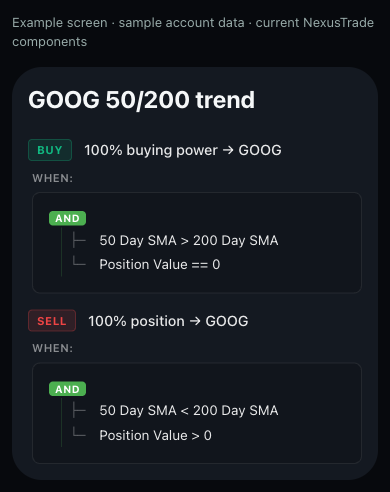
Turn the idea into explicit rules
Buy whole GOOG shares with available buying power when its 50-day average is above its 200-day average and no GOOG is held. Close the holding below the opposite threshold. Equality takes no action.
The preview shows both trend comparisons and holding guards. Saving returns your own draft ID.
Inspect the request
Inspect historical behavior
Read the losing window as well as the stronger ones. These windows have already been examined; freeze the candidate before choosing dates you have not used.
A completed test returns its own ID, curve, drawdown and recorded statistics. Inspect the losing example below.
Inspect the request
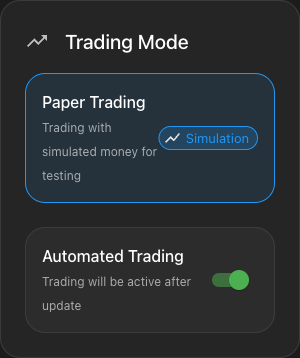
Observe the same rules in paper trading
Create a separate paper portfolio from the reviewed GOOG draft. Record its start date and evaluation schedule. Review pending simulated orders, then follow holdings and dated values while keeping the rules fixed.
The running paper portfolio has a separate ID, evaluation schedule and forward observation log.
Inspect the request
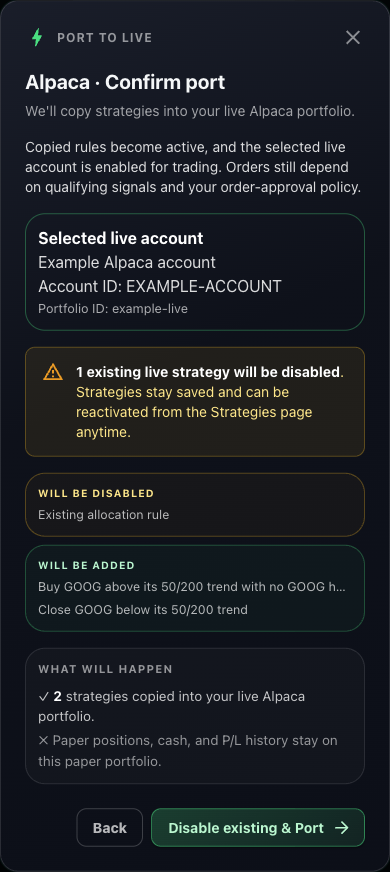
Review the move to your broker
From the reviewed paper portfolio, open Deployment Center and select Port to Live. Compare the selected account, incoming rules and any existing rules that will be disabled. Confirmation enables the live target and activates the copied rules.
Follow the visual live-deployment guideThe app shows the broker account and exact strategy changes before you confirm the move.
Follow the Claude Code session
claude mcp add --transport http nexustrade https://nexustrade.io/api/mcpScroll horizontally to read the full command, or copy it.
This guide runs on NexusTrade's MCP server. Claude Code operated the trading workflow below, from connection to the live review. The agent's role here is operating the workflow through that server.
The table names the tool call, the approval checkpoint, and the artifact to keep at each stage. Placeholders such as a returned draft ID stand for values your own run returns. This page records no IDs from anyone else's run.
The recorded anchor is the four-window table below. It includes the window that lost 6.01% with a 21.46% maximum drawdown.
Show the table · 6 rows, 4 columns
Scroll sideways to compare all columns. Select a heading to sort.
| Connect Claude Code | sec_edgar list_filings for AAPL with limit 1 | Public read only. No portfolios, ingested filings, or changes. | Filing company, form, date, and source URL |
| Research GOOG | Filing and company tools for the latest GOOG filing | Research-only step. Dates, units, and missing values stay with the brief. | Dated GOOG company brief |
| Draft the rules | build_portfolio preview, then create_portfolio | Approve the rules before saving. Stop before tests. | Returned draft ID with a readback |
| Test history | Daily backtest from 2024-08-15 to 2025-04-23 at $10,000 with an SPY baseline | Show the request and estimated cost. Submit once and poll the same test. | Returned backtest ID, curve, and drawdown |
| Observe on paper | Separate paper-only deployment from the reviewed draft at $10,000 | Show the plan, then verify the portfolio is paper. | Running paper ID and dated history |
| Review live | Deployment Center Port to Live review in the app | Compare the account and rule changes before confirmation. | Reviewed live target |
No matching rows. Clear the filter to see all records.
Where Claude Code stops for approval
Each consequential action in this guide waits at an approval gate. The agent previews first and acts only after explicit approval.
The rules preview returns valid and issues before anything is saved. The agent resolves problems and re-previews instead of saving a candidate with open problems.
Approve the rules before the agent saves them
The agent previews the configuration with build_portfolio and shows entry, sizing, exits, valid, and issues. It saves with create_portfolio only after approval and reads the returned draft back.
Approve the test cost before the agent submits once
Historical tests are paid runs. The agent shows the exact request and estimated cost for approval before submitting once, then polls the same returned test ID until complete.
Approve the paper plan and verify it is paper
The paper deployment is a separate portfolio with its own ID. The agent shows the plan for approval, verifies the deployment type, and leaves brokerage accounts unchanged.
Confirm the live move explicitly, or nothing moves
The move to live happens in Deployment Center. The app shows the selected account, the incoming rules, and the existing rules that would be disabled before confirmation enables anything.
Read the four recorded historical tests
These independent development tests each restart with $10,000, whole shares, cash dividends and 0.1% stock transaction fees. The third window lost 6.01%. The stored windows carry no SPY baseline.
Show the table · 4 rows, 6 columns
Scroll sideways to compare all columns. Select a heading to sort.
| 2023-03-30 | 2023-12-06 | 26.23% | Not recorded | 13.19% | 0 |
| 2023-12-07 | 2024-08-14 | 18.61% | Not recorded | 18.27% | 0 |
| 2024-08-15 | 2025-04-23 | -6.01% | Not recorded | 21.46% | 4 |
| 2025-04-24 | 2025-12-31 | 70.86% | Not recorded | 8.67% | 0 |
No matching rows. Clear the filter to see all records.
These four windows are development tests on dates the researchers already examined. They are not independent out-of-sample evidence. Freeze the rules before testing dates you have not used. The stored windows record strategy return only, without an SPY baseline.
Keep the experiment together
Keep the company brief, saved rules, backtest ID, paper observation dates and live account review together. Paper positions, cash and performance history stay on the paper portfolio when you port its strategies.
No comments yet.