Start with a signal that did not become an order
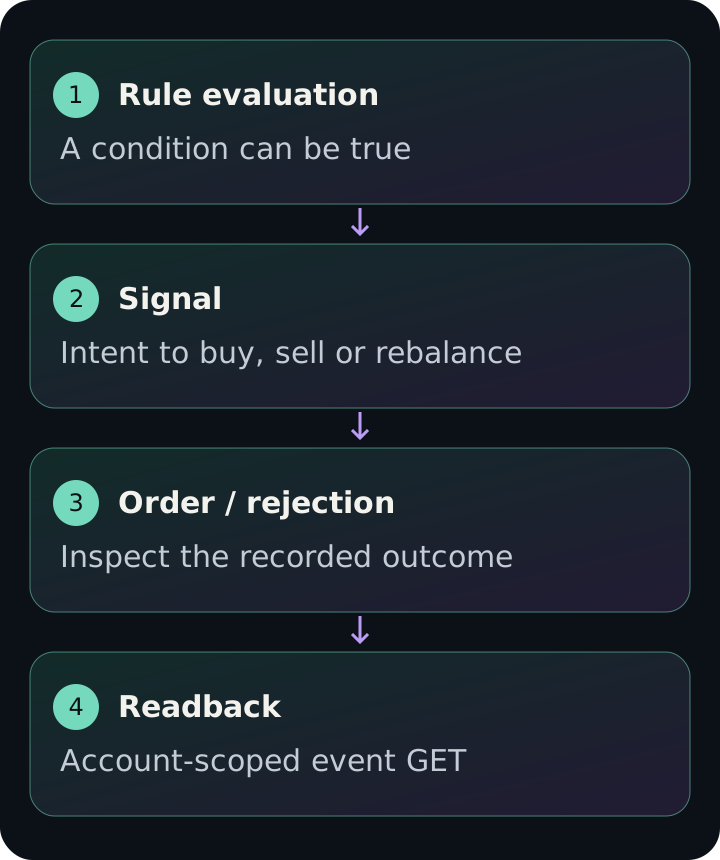
A buy signal records intent. An OrderRejected event records a rejection. Neither proves a fill. Start by counting these separately, then inspect the recorded order status and rejection details in your own account. This guide gives you a small event reader for one existing portfolio and a bounded time window.
The first example is a local fixture with one BuySignal and one OrderRejected. It proves the reader does not turn a signal into an order; it is not a historical trade or a measured execution result.
1. Run the reader locally
Download the Python file below. It uses the Python standard library and needs no account or extra packages for the fixture. Run this command from the folder containing the download.
python3 trading-strategy-observability.pyCheck the fixture output
JSON spacing may differ. The reader counts two records and zero Order events. Its assertion fails if the fixture is mistakenly counted as an order. A real Order event still requires its status and payload to establish what happened.
{"mode":"local fixture","rows":2,"types":{"BuySignal":1,"OrderRejected":1}}2. Read one portfolio you already own
Get an API key with read access from Developers. Keep it in a local environment variable and select a portfolio ID from your own account. The command below asks for the last 24 hours, page 1 and at most 50 returned events. It does not create, activate or test a portfolio.
Replace the placeholders locally. Do not paste a key into Aurora, a public issue or a shared terminal recording.
export NEXUSTRADE_API_KEY="YOUR_READ_API_KEY"
export NEXUSTRADE_PORTFOLIO_ID="YOUR_EXISTING_PORTFOLIO_ID"
python3 trading-strategy-observability.py --read-existingThe request and response you are reading
The normal response contains events and totalPages. Each event has eventType, event, createdAt and metadata. The script prints only counts and the requested window; it deliberately leaves account metadata and event payloads out of its output. Inspect the full response privately when investigating a particular rejection.
The paginated response maps createdAt to the insertion timestamp. The query sorts by the event timestamp internally. Do not treat createdAt as the exact market occurrence time. Optional supported filters include ticker, strategyId and comma-separated orderStatuses. Omit format for this normal response; format=json and format=csv select export behavior.
GET /api/event/portfolio/YOUR_EXISTING_PORTFOLIO_ID?page=1&pageSize=50&startDate=YOUR_UTC_START&endDate=YOUR_UTC_END&eventTypes=BuySignal%2CSellSignal%2COrder%2COrderRejected%2CNoSignal
Authorization: Bearer YOUR_READ_API_KEY
3. Explain what the records establish
BuySignal or SellSignal without an Order
There is recorded intent but no order in this returned window. Narrow to the same ticker and strategy, check adjacent times and inspect rejection or guard records before concluding that execution failed.
OrderRejected
Read the event payload privately for the recorded reason. Correct the stated input or account constraint before considering another action; reading the event does not retry it.
Order
Inspect the recorded order status. A submitted or pending order is not a fill, and a count of Order records is not a count of completed trades.
NoSignal or an empty page
The rule may not have fired, the window may be wrong, or coverage may be incomplete. Empty results do not establish that the portfolio was evaluated successfully.
Keep the window small and interpret coverage honestly
Recent events use MongoDB; older events can come from Parquet queried through DuckDB. The current live hot window is 72 hours. Results from both stores are merged by event ID, with the later insertion retained for duplicates. This architecture is not a guarantee that every past event is available.
Each source query is capped before pagination. totalPages describes the merged fetched records, not a certified count of the complete history. This reader intentionally reads one page. For a busy account, reduce the date range and add ticker or strategyId rather than treating a deep page scan as an audit of everything.
On 401, check the key and expiry. On a scope error, use read access. On 404, verify the portfolio exists in the authenticated account. A 400 can reflect malformed filters; start with the downloaded request and a valid UTC date window. Keep customer payloads out of shared logs.
Bring a redacted observation to Aurora
Use the prompt to interpret a local summary. Replace the placeholders with counts and the time window, not credentials or private payloads.