Build the loop before connecting a model
ReAct interleaves reasoning and actions. A useful implementation also needs a tool allowlist, validated arguments and a stopping rule. Build those controls locally before adding a model or an account connection.
The example below makes authored decisions, calculates an illustrative position exposure and uses that observation in its next decision. Its output is real local arithmetic, not a model response, trading performance or customer account record. The Aurora reader later in this guide shows how the product exposes an existing run.
1. Run a complete local loop
Download this standalone Python file and run it. It uses the standard library, needs no API key and makes no network request. One decision calls calculate_exposure; the next receives its result and finishes.
python3 react-agent-loop-demo.pyThe complete control loop
Read and copy the full runnable Python example
The only allowed tool calculates exposure. The decision adapter receives the conversation so far; the loop appends the requested action and its tool observation before asking for another decision. A final answer ends the loop. Unknown tools, invalid arguments and malformed decisions stop with an error instead of executing another action.
"""A complete local ReAct control loop. Authored fixture decisions; no LLM or HTTP."""
import json
import math


def calculate_exposure(arguments):
    if not isinstance(arguments, dict) or set(arguments) != {"position_value", "portfolio_value"}:
        raise ValueError("Expected position_value and portfolio_value")
    position, portfolio = arguments["position_value"], arguments["portfolio_value"]
    if any(isinstance(value, bool) or not isinstance(value, (int, float)) or not math.isfinite(value)
           for value in (position, portfolio)):
        raise ValueError("Values must be finite numbers")
    if position < 0 or portfolio <= 0:
        raise ValueError("Position must be nonnegative and portfolio positive")
    exposure = 100 * (position / portfolio)
    if not math.isfinite(exposure):
        raise ValueError("Exposure must be finite")
    return {"exposure_pct": exposure}


TOOLS = {"calculate_exposure": calculate_exposure}


def run_loop(decide, max_iterations=4):
    if not isinstance(max_iterations, int) or isinstance(max_iterations, bool) or not 1 <= max_iterations <= 20:
        raise ValueError("max_iterations must be an integer from 1 to 20")
    messages = [{"role": "user", "content": "Calculate the exposure of an illustrative $8,000 position in a $10,000 portfolio."}]
    tool_calls = 0
    for iteration in range(1, max_iterations + 1):
        try:
            decision = decide(list(messages))
            if not isinstance(decision, dict):
                raise ValueError("Decision must be an object")
            if decision.get("type") == "finish":
                if set(decision) != {"type", "answer"} or not isinstance(decision["answer"], str) or not decision["answer"].strip():
                    raise ValueError("Final answer must be nonempty text")
                return {"status": "completed", "iterations": iteration, "toolCalls": tool_calls, "answer": decision["answer"]}
            if set(decision) != {"type", "tool", "arguments"} or decision["type"] != "tool":
                raise ValueError("Expected a tool decision or final answer")
            name = decision["tool"]
            if not isinstance(name, str) or name not in TOOLS:
                raise ValueError("Tool is not allowed")
            observation = TOOLS[name](decision["arguments"])
            tool_calls += 1
            messages.append({"role": "assistant", "content": decision})
            messages.append({"role": "tool", "name": name, "content": observation})
        except (ValueError, TypeError, KeyError, OverflowError) as error:
            return {"status": "error", "iterations": iteration, "toolCalls": tool_calls, "error": str(error)}
    return {"status": "max_iterations_reached", "iterations": max_iterations, "toolCalls": tool_calls}


def fixture_decision(messages):
    if messages[-1]["role"] == "tool":
        exposure = messages[-1]["content"]["exposure_pct"]
        return {"type": "finish", "answer": f"Fixture exposure: {exposure:.2f}%"}
    return {"type": "tool", "tool": "calculate_exposure", "arguments": {"position_value": 8000, "portfolio_value": 10000}}


if __name__ == "__main__":
    print(json.dumps(run_loop(fixture_decision)))
Check what actually ran
The fixture divides $8,000 by $10,000 and multiplies by 100. It takes two decisions and one tool call. This is position exposure arithmetic, not a recommendation to hold an 80% position.
If an adapter keeps requesting the tool, the loop stops after four decisions with max_iterations_reached. A zero portfolio value stops with error. These are tested outcomes, not successful answers.
{"status":"completed","iterations":2,"toolCalls":1,"answer":"Fixture exposure: 80.00%"}2. Replace the decision adapter deliberately
To connect a model, replace fixture_decision with a function that accepts messages and returns one of the exact JSON objects below. Pass that function to run_loop. Keep tool execution inside the loop; a model-selected name must still pass the allowlist and argument checks.
Your provider adapter must translate these messages to its documented tool or structured-output format, parse the returned decision and set its own request timeout and cost limit. This guide does not assume that different providers accept the same message schema. The local iteration cap cannot interrupt a stalled network call inside an adapter.
{"type":"tool","tool":"calculate_exposure","arguments":{"position_value":8000,"portfolio_value":10000}}

{"type":"finish","answer":"Fixture exposure: 80.00%"}
3. Test the existing-run reader separately
Download the Python reader and run its fixture. It needs no key, network connection or third-party package. The second fixture page changes one message and adds another.
python3 react-agent-loop.pyCheck the fixture output
The same event ID appears with a new digest. Keeping the newest record for that ID gives two messages instead of three. Append-only rendering would show the outdated draft as an extra message.
{"mode":"local fixture","uniqueMessages":2,"editedMessageReplaced":true}4. Read an existing Aurora agent
Get a read-capable API key from Developers and an agent ID from a run in your own account. Use an existing run; this example does not call POST /agents. The reader requests the snapshot and at most four pages of 50 messages.
export NEXUSTRADE_API_KEY="YOUR_READ_API_KEY"
export NEXUSTRADE_AGENT_ID="YOUR_EXISTING_AGENT_ID"
python3 react-agent-loop.py --read-existingTwo GETs answer different questions
The snapshot returns agent with id, status, prompt and terminal. The events endpoint directly returns events, nextCursor, hasMore, supersededFirst, status, needsInput and terminal; pendingApproval appears when applicable. There is no data wrapper around the event page.
An event has id, digest, role and text, with optional data. These are conversation messages, not a public API for internal trace spans or hidden model reasoning. The downloaded script reports state and counts while keeping message text, prompts and identifiers out of its printed summary.
GET /api/v1/nexustrade/agents/YOUR_EXISTING_AGENT_ID
GET /api/v1/nexustrade/agents/YOUR_EXISTING_AGENT_ID/events?limit=50
Authorization: Bearer YOUR_READ_API_KEY
5. Follow the cursor and replace edits
Cursors are opaque. Send nextCursor unchanged as cursor on the next request. Store events by id and replace the earlier record when its digest or content changes. supersededFirst flags an updated boundary message; deduplication by id prevents that edit becoming an extra row.
If hasMore is still true after this reader stops, its message history is incomplete. Continue from the last cursor in a private application if needed. Do not repeatedly create agents to recover a missed page. A stale or invalid cursor should be handled as a read failure, not permission to launch a replacement run.
for event in page["events"]:
    seen[event["id"]] = event

if page["hasMore"]:
    cursor = page["nextCursor"]
    # Send cursor verbatim on the next GET; do not increment it.
6. Choose the next step from the saved status
pending_plan_approval or pending_action_approval
Inspect the plan or action in the app. pendingApproval identifies which kind needs review. Reading this page grants no approval; account actions require their own permissions and deliberate choice.
awaiting_user_input
Read the latest question privately and answer it in the existing conversation. needsInput is a useful signal for your UI; do not assume another model call is needed.
waiting_for_computation or waiting_for_subagents
The run is waiting for existing work. Keep the same agent ID and read later. Avoid submitting duplicate work because the next message has not arrived.
completed, stopped, error, max_iterations_reached or plan_rejected
These are terminal statuses. terminal true alone does not mean success. Read the final message or error privately to distinguish a completed answer from an interrupted run.
What happens inside each decision
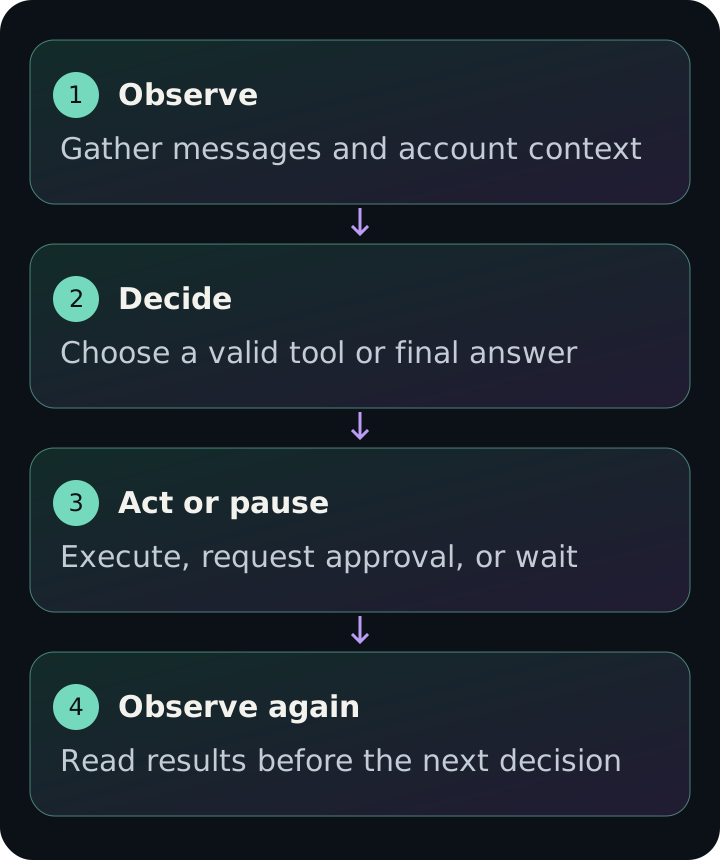
The stepper gathers context, builds the ReAct prompt and validates the proposed tools before execution. A new decision advances the iteration count; replaying a pending tool is handled separately. An action can return results, request approval or leave the run waiting for computation before the next decision.
The current action batch cap is 10 actions per turn. It is not the maximum number of agent iterations or a promise of 10 simultaneous tasks. Internal trace records can carry action IDs, durations and usage, but the conversation event contract does not promise those fields. Missing usage and cost fields do not establish a free run.
A snapshot and an event page are separate reads, so their statuses can differ while a run advances. Keep both values and refresh rather than declaring a contradiction. On 401 or a scope error, check read access; on 404, check ownership and the exact ID. A compute-only credential cannot use these Agent-run endpoints.
Review a redacted run summary in Aurora
Use an existing run summary to ask which state requires attention. Leave its private prompt and message text out unless you intend to share them in your account conversation.