
Follow this worked strategy
I connected Grok Bot to the NexusTrade trading API and had it research SOL-USD and test an RSI momentum rule across the completed 2024 run. The agent operated this workflow through NexusTrade's MCP server; it did not build the integration. The rule lost 5.18% against SPY at 25.30%, with $2568.88 in recorded fees. This is a development test on examined dates. Judge frozen rules on dates you have not used yet.
Follow the full journey
Connect Grok Bot
Connect NexusTrade to this task
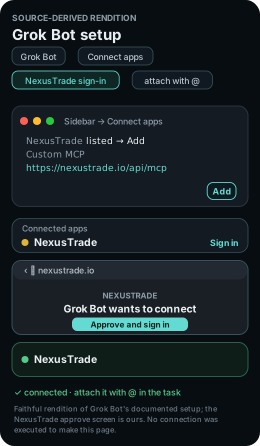
https://nexustrade.io/api/mcpOpen Connect apps in Grok Bot’s sidebar. If NexusTrade is listed, choose Add, complete browser sign-in and attach it with @ in this task. For an existing custom MCP connection, use the endpoint shown here.
What you should see: NexusTrade tools are available to the task after authentication. The rendition above shows the documented setup, not verification of your account.
The result identifies Apple's company filing, filing date and source URL. The connection check makes no account changes.
Inspect the request
Research SOL-USD and its trading calendar
Inspect the spot pair, source timestamps and fee model. This strategy evaluates daily indicators while crypto prices also move on weekends.
A dated brief names the instrument, original sources and assumptions that matter to this strategy.
Inspect the request
Preview the SOL RSI momentum rules
Keep the exact daily indicator thresholds and flat-position guard shown here. Allocate 95% of buying power on entry and close all held units when the exit fires.
- Entry
- Saved rule: RSI(14, Day) > 60 AND position value = 0
- Exit
- Saved rule: RSI(14, Day) <= 50 AND position value > 0
- Allocation
- Saved rule: 95% of buying power per entry; sell 100% of held units on exit
- Pair
- Saved rule: SOL-USD
The preview resolves this specific pair, entry, exit and fractional spot sizing.
Inspect the request
- SOL RSI momentum 2024-12-31, 21:00:00 UTC
- 9,481.94
- SPY buy and hold 2024-12-31, 21:00:00 UTC
- 12,530.29
- BTC buy and hold 2024-12-31, 21:00:00 UTC
- 21,926.92
Inspect the completed SOL-USD test
Read this strategy curve alongside the full-capital SPY and BTC comparisons. The 0.7% fee on each fill is part of the recorded result.
- Backtest return
- -5.18%
- Reported maximum drawdown
- 26.35%
- Total recorded trading fees
- $2568.88
- Ending portfolio value
- $9481.94
The completed 2024 SOL RSI momentum simulation returned -5.18% with reported maximum drawdown 26.35%.
Inspect the request
Observe SOL RSI momentum in paper trading
Observe the SOL-USD rule prospectively with fractional spot units. Keep its daily indicator window and 95% entry allocation while recording weekend evaluations.
- Inspect before accepting an order
- The SOL-USD signal, spot units, fee, cash balance, flat-position guard, daily evaluation schedule and weekend behavior.
Your paper portfolio has its own ID, start date, schedule and dated history. These forward observations begin with your own run.
Inspect the request
Review SOL RSI momentum for live deployment
Check the actual connection for this specific spot pair before preparing a live move. Review venue support, pair naming, minimum order size and its operating calendar.
Open the live deployment walkthrough- Account and instrument review
- SOL-USD spot support, fractional units, minimum order size, venue fees, weekend timing and exits; stop if the pair is unsupported.
The review identifies the target account, supported instruments, rule changes and approval settings before confirmation.
Inspect the request
Follow the Grok Bot session
This guide runs on NexusTrade's MCP server. Grok Bot operated the trading workflow below, from connection to the live review. The agent's role here is operating the workflow through that server.
The table names the tool call, the approval checkpoint, and the artifact to keep at each stage. Placeholders such as a returned draft ID stand for values your own run returns. This page records no IDs from anyone else's run.
The recorded anchor is the completed 2024 test below. It lost 5.18% against SPY at 25.30%, with $2568.88 in recorded fees.
Show the table · 6 rows, 4 columns
Scroll sideways to compare all columns. Select a heading to sort.
| Connect Grok Bot | sec_edgar list_filings for AAPL with limit 1 | Public read only. No portfolios, ingested filings, or changes. | Filing company, form, date, and source URL |
| Research SOL-USD | Spot pair, calendar, timestamps, and fee model | Pair support is checked separately from the historical model. | Dated SOL-USD brief |
| Draft the rules | build_portfolio preview, then one create_portfolio | Approve the rules before saving. Stop before paid tests. | Returned draft ID with a readback |
| Test history | Daily 2024 backtest at $10,000 with a 0.7% crypto fee and SPY and BTC comparisons | Show the request and estimated cost before submission. | Same test ID with events, cash, and position values |
| Trade on paper | Separate paper-only deployment at $10,000 | Show the plan. Verify the portfolio is paper. | Running paper ID and dated history |
| Review live | Live deployment review against the actual account | Live trading stays unchanged until explicit confirmation. | Reviewed plan, or a stop report when unsupported |
No matching rows. Clear the filter to see all records.
Where Grok Bot stops for approval
Each consequential action in this guide waits at an approval gate. The agent previews first and acts only after explicit approval.
The rules preview returns valid and issues before anything is saved. The agent resolves problems and re-previews instead of saving a candidate with open problems.
Approve the rules before the agent saves them
The agent previews the configuration with build_portfolio and shows entry, sizing, exits, valid, and issues. It saves with create_portfolio only after approval and reads the returned draft back.
Approve the test cost before the agent submits once
Historical tests are paid runs. The agent shows the exact request and estimated cost for approval before submitting once, then polls the same returned test ID until complete.
Approve the paper plan and verify it is paper
The paper deployment is a separate portfolio with its own ID. The agent shows the plan for approval, verifies the deployment type, and leaves brokerage accounts unchanged.
Confirm the live move explicitly, or nothing moves
The agent reads the actual account and broker capabilities first and keeps live trading unchanged until explicit confirmation. It reports an unsupported instrument or action and stops.
Inspect the captured SOL-USD measurements
Inspect exact historical measurements
This saved algorithm completed a Day backtest from 2024-01-01 through 2024-12-31, with $10000.00 starting capital. The chart includes all 744 exported history points.
Compare the strategy with SPY and BTC buy and hold. Each benchmark invests the full $10000.00 starting balance over the same 2024 period. SPY follows its trading sessions; BTC includes weekends. This algorithm follows its own allocation and entry/exit rules, with 0.7% of traded notional charged on each fill. Explore cash and position values to see how capital was deployed.
The 2024 curve set uses the same $10,000 starting basis for the strategy, SPY buy and hold, and BTC buy and hold. BTC is a crypto-market reference here, while SPY is the broad-market baseline. Treat the run as development evidence from examined dates.
Scroll sideways to compare all columns. Select a heading to sort.
| Status | COMPLETE |
| Backtest return | -5.18% |
| Reported maximum drawdown | 26.35% |
| SPY buy-and-hold return | 25.30% |
| BTC buy-and-hold return | 119.27% |
| Total recorded trading fees | $2568.88 |
| Engine closed-trade count | 45 |
| Starting capital | $10000.00 |
| Ending portfolio value | $9481.94 |
| Ending cash | $421.52 |
| Ending position value | $9060.42 |
No matching rows. Clear the filter to see all records.
Inspect the recorded trades
Mar 21, 2024
PairSOL-USD
SideSell
Units (rounded)0.00347819
Submitted price$176.99
Filled price$176.99
Fee$0.00
Mar 25, 2024
PairSOL-USD
SideBuy
Units (rounded)44.41392493
Submitted price$186.77
Filled price$186.77
Fee$58.07
Mar 27, 2024
PairSOL-USD
SideSell
Units (rounded)44.10302746
Submitted price$182.57
Filled price$182.57
Fee$56.36
Apr 02, 2024
PairSOL-USD
SideSell
Units (rounded)0.31089747
Submitted price$177.36
Filled price$177.36
Fee$0.39
Apr 20, 2024
PairSOL-USD
SideBuy
Units (rounded)52.89928140
Submitted price$151.37
Filled price$151.37
Fee$56.05
Apr 24, 2024
PairSOL-USD
SideSell
Units (rounded)52.52898643
Submitted price$150.29
Filled price$150.29
Fee$55.26
Apr 25, 2024
PairSOL-USD
SideSell
Units (rounded)0.37029497
Submitted price$143.69
Filled price$143.69
Fee$0.37
May 03, 2024
PairSOL-USD
SideBuy
Units (rounded)55.12765659
Submitted price$142.30
Filled price$142.30
Fee$54.91
Recorded rows in source order; spacing does not represent elapsed time.
Inspect the recorded entries and exits
Scroll sideways to compare all columns. Select a heading to sort.
| Mar 21, 2024 | SOL-USD | Sell | 0.00347819 | $176.99 | $176.99 | $0.00 |
| Mar 25, 2024 | SOL-USD | Buy | 44.41392493 | $186.77 | $186.77 | $58.07 |
| Mar 27, 2024 | SOL-USD | Sell | 44.10302746 | $182.57 | $182.57 | $56.36 |
| Apr 02, 2024 | SOL-USD | Sell | 0.31089747 | $177.36 | $177.36 | $0.39 |
| Apr 20, 2024 | SOL-USD | Buy | 52.89928140 | $151.37 | $151.37 | $56.05 |
| Apr 24, 2024 | SOL-USD | Sell | 52.52898643 | $150.29 | $150.29 | $55.26 |
| Apr 25, 2024 | SOL-USD | Sell | 0.37029497 | $143.69 | $143.69 | $0.37 |
| May 03, 2024 | SOL-USD | Buy | 55.12765659 | $142.30 | $142.30 | $54.91 |
No matching rows. Clear the filter to see all records.
Follow the Filled events by pair, side and time. Compare the submitted price, filled price, fractional quantity and fee. This table shows up to eight orders from the captured excerpt (50 Filled events).
For a percentage fee, multiply the traded notional by 0.007. To follow a position, start with a purchase and inspect subsequent sale quantities, remaining holdings and cash flows. For the weekly accumulation example, follow each purchase and the resulting position value.
Inspect the original signal record
View captured signal JSON
{
  "eventType": "BuySignal",
  "event": {
    "eventType": "BuySignal",
    "timestamp": "2024-12-31T14:30:00.000Z",
    "signals": [
      {
        "conditionName": "14 Day SOL-USD RSI > Constant 60 and Position market value (SOL-USD) = Constant 0",
        "audit": {
          "type": "minimal",
          "results": {
            "0.1": {
              "isTrue": true,
              "lhsValue": 0,
              "rhsValue": 0,
              "lhsError": null,
              "rhsError": null,
              "comparison": "equal"
            },
            "0.0": {
              "isTrue": true,
              "lhsValue": 61.53215563468187,
              "rhsValue": 60,
              "lhsError": null,
              "rhsError": null,
              "comparison": "greaterThan"
            }
          },
          "failuresOnly": false
        },
        "isTrue": true,
        "actionName": "Buy",
        "actionMetadata": {
          "buyOrSell": {
            "targetAsset": {
              "name": "SOL-USD",
              "symbol": "SOL-USD",
              "type": "Cryptocurrency",
              "underlyingSymbol": null,
              "optionType": null,
              "expirationDate": null,
              "strikePrice": null,
              "multiplier": null
            },
            "allocation": {
              "type": "percent of buying power",
              "amount": 95
            },
            "price": 197.67999267578125,
            "orderType": "Market Order"
          }
        },
        "orderExecution": {
          "type": "Market"
        }
      }
    ]
  },
  "timestamp": 1735655400000
}
No comments yet.