
Follow this worked strategy
I connected Gemini CLI to the NexusTrade trading API and had it research Tesla and preview a volatility breakout draft with a $1,000 entry above the upper Bollinger band. The agent operated this workflow through NexusTrade's MCP server; it did not build the integration. The preview returns valid with an empty issues list. No historical result is recorded yet, and the first test runs only after the rules are approved.
Follow the full journey
Connect Gemini CLI
Connect Gemini CLI in the intended environment
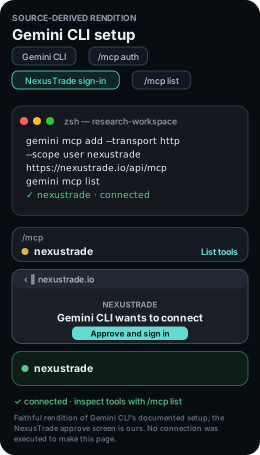
gemini mcp add --transport http --scope user nexustrade https://nexustrade.io/api/mcp
gemini mcp list
Scroll horizontally to read the full command, or copy it.
With Gemini CLI installed, run the registration command below in your research workspace. Start gemini, enter /mcp auth nexustrade and finish NexusTrade browser sign-in. Use /mcp list to inspect the tools.
The result identifies Apple's company filing, filing date and source URL. The connection check makes no account changes.
Inspect the request
Research Tesla
Open the latest company filing and date the brief before testing this price-based idea. The captured Q2 2026 filing covers the period ending June 30, 2026.
- Company
- Tesla (TSLA)
- Filing captured
- Q2 2026 10-Q; filed July 23, 2026
A dated brief names the instrument, original sources and assumptions that matter to this strategy.
Inspect the request
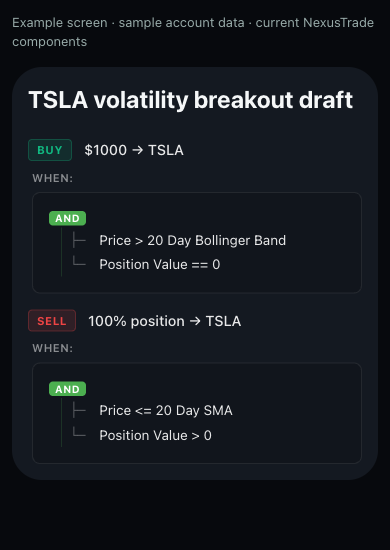
Preview the TSLA rules
Inspect the entry and exit in the native rule display. This candidate uses a $1,000 whole-share entry and a flat-position guard; the exact configuration is available with the copy request.
- Execution
- $10,000 initial cash; $1,000 entry; whole shares; cash dividends; manual approval
The preview returns valid=true and an empty issues list for these rules. Saving later returns your own draft ID.
Inspect the request
Run the first TSLA historical test
Freeze these thresholds and choose a dated daily test before reading the result. Compare the TSLA curve with holding the same stock over matched dates.
- Current status
- Historical test pending
- Example test plan
- 2024-01-01 through 2024-12-31; daily; $10,000
- Costs
- 0.1% stock fee per fill; cash dividends; whole shares
A completed test supplies its own return, drawdown, fees and order history. This new draft has no recorded historical result yet.
Inspect the request
Observe TSLA volatility breakout in paper trading
Observe this TSLA candidate prospectively after reviewing its historical test. A $1,000 entry limits the amount committed per signal; the exit remains the indicator threshold shown above.
- Inspect before accepting an order
- The TSLA indicator value, share rounding, $1,000 entry, holding guard, exit and order approval.
Your paper portfolio has its own ID, start date, schedule and dated history. These forward observations begin with your own run.
Inspect the request
Review TSLA volatility breakout for live deployment
Review the paper candidate in Deployment Center, then choose Port to Live and inspect the actual target account before confirmation.
Open the live deployment walkthrough- Account and instrument review
- Whole-share TSLA support, available buying power, evaluation timing, $1,000 entry, exit rule and manual order approval.
The review identifies the target account, supported instruments, rule changes and approval settings before confirmation.
Inspect the request
Follow the Gemini CLI session
gemini mcp add --transport http --scope user nexustrade https://nexustrade.io/api/mcp
gemini mcp list
Scroll horizontally to read the full command, or copy it.
This guide runs on NexusTrade's MCP server. Gemini CLI operated the trading workflow below, from connection to the live review. The agent's role here is operating the workflow through that server.
The table names the tool call, the approval checkpoint, and the artifact to keep at each stage. Placeholders such as a returned draft ID stand for values your own run returns. This page records no IDs from anyone else's run.
No historical result is recorded for this draft yet. The filing below dates the research brief, and the first test runs only after approval.
Show the table · 6 rows, 4 columns
Scroll sideways to compare all columns. Select a heading to sort.
| Connect Gemini CLI | sec_edgar list_filings for AAPL with limit 1 | Public read only. No portfolios, ingested filings, or changes. | Filing company, form, date, and source URL |
| Research Tesla | sec_edgar list_filings and fundamentals for TSLA | The brief carries the filing URL, date, period, and units. | Dated TSLA brief |
| Draft the rules | build_portfolio preview, then one create_portfolio | Approve the rules before saving. Stop before paid tests. | Returned draft ID with a readback |
| Test history | Daily 2024 test at $10,000 with a TSLA baseline | Show the exact request and estimated cost. Submit once and poll the same ID. | Return, drawdown, fees, and order events |
| Trade on paper | Separate paper-only deployment at $10,000 | Show the plan. Verify the portfolio is paper. | Running paper ID and dated history |
| Review live | Live deployment review against the actual account | Live trading stays unchanged until explicit confirmation. | Reviewed plan, or a stop report when unsupported |
No matching rows. Clear the filter to see all records.
Where Gemini CLI stops for approval
Each consequential action in this guide waits at an approval gate. The agent previews first and acts only after explicit approval.
The rules preview returns valid and an empty issues list before anything is saved. The agent resolves problems and re-previews instead of saving a candidate with open problems.
Approve the rules before the agent saves them
The agent previews the configuration with build_portfolio and shows entry, sizing, exits, valid, and issues. It saves with create_portfolio only after approval and reads the returned draft back.
Approve the test cost before the agent submits once
Historical tests are paid runs. The agent shows the exact request and estimated cost for approval before submitting once, then polls the same returned test ID until complete.
Approve the paper plan and verify it is paper
The paper deployment is a separate portfolio with its own ID. The agent shows the plan for approval, verifies the deployment type, and leaves brokerage accounts unchanged.
Confirm the live move explicitly, or nothing moves
The agent reads the actual account and broker capabilities first and keeps live trading unchanged until explicit confirmation. It reports an unsupported instrument or action and stops.
Open the company filing
The filing dates the research brief. The proposed 2024 historical test uses price indicators; future company figures are outside those rules.
No comments yet.