
Follow this worked strategy
I connected ChatGPT to the NexusTrade trading API and had it research S&P 500 dividend growers and test a five-company allocation across two recorded periods. The agent operated this workflow through NexusTrade's MCP server; it did not build the integration. The 2025 test returned 44.80% against SPY at 33.99%, while the long 2014 run trailed SPY 340.90% to 419.23%. These are development tests on examined dates. Judge frozen rules on dates you have not used yet.
Follow the full journey
Connect ChatGPT
https://nexustrade.io/api/mcpConnect ChatGPT in the intended environment
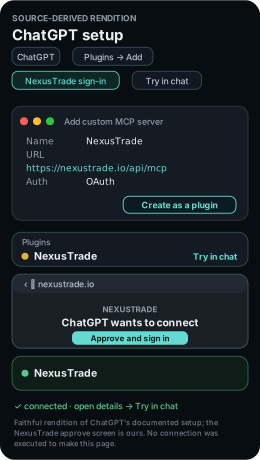
On ChatGPT web, open Plugins → Add → Add custom MCP server. Name it NexusTrade, enter https://nexustrade.io/api/mcp and choose OAuth. Review the notice, select I understand and want to continue, then Create as a plugin. Finish NexusTrade sign-in. Open the plugin’s details and choose Try in chat.
The result identifies Apple's company filing, filing date and source URL. The connection check makes no account changes.
Inspect the request
Research the dividend-grower universe
Inspect which S&P 500 companies satisfy ten years of annual dividend increases, then rank qualifying companies by market cap. The eligible universe and actual holdings are separate records.
A dated brief names the instrument, original sources and assumptions that matter to this strategy.
Inspect the request
Preview the five-company allocation
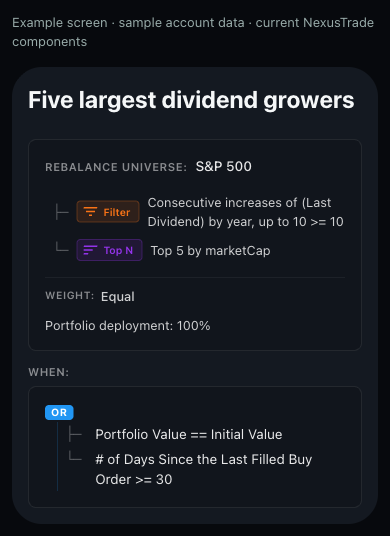
Filter the S&P 500 universe for ten annual dividend increases, select the five largest qualifying companies by market cap and target equal weights. Review the saved elapsed-time trigger.
- Allocation trigger
- Review allocations when portfolio value equals its initial value OR at least 30 days have passed since a filled buy. This is not an exact monthly schedule.
- Equal weights
- Each selected company has the same weight: five qualifying companies would target 20% each before execution effects.
- Execution assumptions
- Fractional shares and reinvested dividends; the original stock fee was 0.1% per transaction.
The DynamicRebalance preview retains the universe, filter, ranking, weights and filled-buy timing trigger.
Inspect the request
Portfolio value (USD)
- Five dividend growers 2026-10-07
- $14,479.88
- SPY buy and hold 2026-10-07
- $13,399.03
Five dividend growers: 22.41% largest decline in plotted observations. 2025-02-13 ($10,415.39) to 2025-04-08 ($8,081.82).
Inspect the completed dividend tests
The recorded January 2, 2025 through October 7, 2026 test uses fractional shares, reinvested dividends and a 0.1% stock fee. Inspect the longer period below before choosing a new test window.
- Strategy return
- 44.80%
- SPY return
- 33.99%
- Maximum drawdown
- 24.33%
- Strategy fees
- $24.15
The shorter simulation returned 44.80% versus SPY 33.99%. The longer period returned 340.90% versus SPY 419.23%.
Inspect the request
Observe Five dividend growers in paper trading
Observe which five companies the unchanged dynamic pipeline selects now. Inspect the actual rebalance and fill history when the initial-value or 30-day-since-filled-buy trigger is satisfied.
- Inspect before accepting an order
- Eligible universe versus selected holdings, equal-weight targets, fractional fills, dividend reinvestment and actual trigger timing.
Your paper portfolio has its own ID, start date, schedule and dated history. These forward observations begin with your own run.
Inspect the request
Review Five dividend growers for live deployment
Review the live target for fractional equity support, universe eligibility and reinvestment settings before accepting the copied dynamic allocation.
Open the live deployment walkthrough- Account and instrument review
- Fractional equity support, each selected company, target weights, buying power, dividend policy and elapsed-time trigger.
The review identifies the target account, supported instruments, rule changes and approval settings before confirmation.
Inspect the request
Follow the ChatGPT session
This guide runs on NexusTrade's MCP server. ChatGPT operated the trading workflow below, from connection to the live review. The agent's role here is operating the workflow through that server.
The table names the tool call, the approval checkpoint, and the artifact to keep at each stage. Placeholders such as a returned draft ID stand for values your own run returns. This page records no IDs from anyone else's run.
The recorded anchor is the two recorded periods below. The long 2014 run returned 340.90% against SPY at 419.23%.
Show the table · 6 rows, 4 columns
Scroll sideways to compare all columns. Select a heading to sort.
| Connect ChatGPT | sec_edgar list_filings for AAPL with limit 1 | Public read only. No portfolios, ingested filings, or changes. | Filing company, form, date, and source URL |
| Research the universe | S&P 500 dividend-growth coverage and market-cap ranking | Eligible companies stay separate from the selected five. | Dated universe brief |
| Draft the rules | build_portfolio preview, then one create_portfolio | Approve the rules before saving. Stop before paid tests. | Returned draft ID with a readback |
| Test history | Historical test from 2025-01-02 to 2026-10-07 at $10,000 with an SPY baseline | Show the request and estimated cost before submission. | Holdings after each filled rebalance |
| Trade on paper | Separate paper-only deployment at $10,000 | Show the plan. Verify the portfolio is paper. | Running paper ID and dated history |
| Review live | Live deployment review against the actual account | Live trading stays unchanged until explicit confirmation. | Reviewed plan, or a stop report when unsupported |
No matching rows. Clear the filter to see all records.
Where ChatGPT stops for approval
Each consequential action in this guide waits at an approval gate. The agent previews first and acts only after explicit approval.
The rules preview returns valid and issues before anything is saved. The agent resolves problems and re-previews instead of saving a candidate with open problems.
Approve the rules before the agent saves them
The agent previews the configuration with build_portfolio and shows entry, sizing, exits, valid, and issues. It saves with create_portfolio only after approval and reads the returned draft back.
Approve the test cost before the agent submits once
Historical tests are paid runs. The agent shows the exact request and estimated cost for approval before submitting once, then polls the same returned test ID until complete.
Approve the paper plan and verify it is paper
The paper deployment is a separate portfolio with its own ID. The agent shows the plan for approval, verifies the deployment type, and leaves brokerage accounts unchanged.
Confirm the live move explicitly, or nothing moves
The agent reads the actual account and broker capabilities first and keeps live trading unchanged until explicit confirmation. It reports an unsupported instrument or action and stops.
Inspect the longer recorded period
Portfolio value (USD)
- Five dividend growers 2026-10-07
- $44,089.69
- SPY buy and hold 2026-10-07
- $51,922.83
Five dividend growers: 22.80% largest decline in plotted observations. 2014-11-21 ($10,674.15) to 2015-08-25 ($8,240.24).
Inspect the 2014 through 2026 curve
- Strategy return
- 340.90%
- SPY return
- 419.23%
- Maximum drawdown
- 24.16%
- Strategy fees
- $331.98
Recorded historical simulation: Jan 02, 2014 to Oct 07, 2026. Initial capital was $10,000.
These examined periods are development evidence. Historical S&P 500 membership at each date is not established by this receipt; the 2014 run is a retrospective simulation rather than proof of an investable selection.
The long-period chart pairs the allocation with SPY buy and hold on the same $10,000 starting basis. Historical S&P 500 membership at each date remains an open scope limit in the recorded receipt.
Compare the other recorded periods
Show the table · 3 rows, 6 columns
Scroll sideways to compare all columns. Select a heading to sort.
| 2025-01-02 | 44.80% | 33.99% | 24.33% | 49 | $24.15 |
| 2022-01-03 | 134.94% | 73.13% | 24.16% | 153 | $103.47 |
| 2014-01-02 | 340.90% | 419.23% | 24.16% | 422 | $331.98 |
No matching rows. Clear the filter to see all records.
The same rules also have completed runs starting in 2022 and 2014. Compare the full period table before selecting a variant; the long 2014 run returned less than SPY.
No comments yet.