One call, four checks
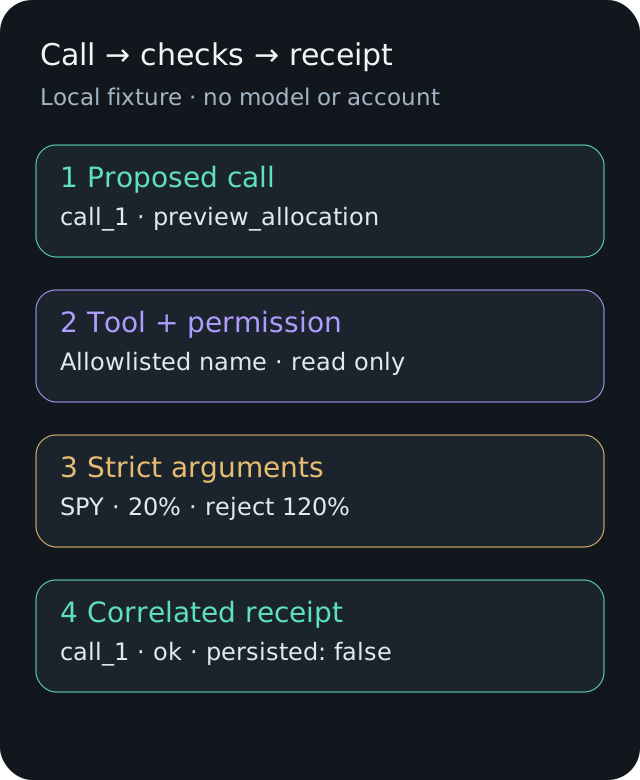
Start with a local allocation preview. It accepts a ticker and percentage, validates them, and returns a receipt with the original call ID. The SPY 20% input is a teaching fixture, not a trading recommendation or a NexusTrade portfolio request.
Run the example
1. Save the files together
Download dispatcher.mjs and dispatcher.test.mjs into an empty folder. Use Node.js 24, the version used to verify this example.
2. Run the scripted calls
Run node dispatcher.mjs. You should see one successful preview, one invalid percentage and one unknown tool.
3. Test the failure paths
Run node --test dispatcher.test.mjs. Tests cover duplicate IDs, concurrent reuse, unsupported fields, denied writes, exhausted budget and redacted errors.
node dispatcher.mjs
node --test dispatcher.test.mjsThe actual local output
These receipts were produced by running the downloadable fixture. call_3 fails at tool lookup: place_order is deliberately absent from the registry. A registered preview with permission write fails with PERMISSION_DENIED.
{"id":"call_1","status":"ok","result":{"symbol":"SPY","allocationPercent":20,"persisted":false}}
{"id":"call_2","status":"error","code":"INVALID_ARGUMENTS"}
{"id":"call_3","status":"error","code":"UNKNOWN_TOOL"}
Run the LangChain adapter without a model
The adapter uses LangChain's tool schema and invoke method around the same handler. The dispatcher retains the same permission, budget and receipt policy, so the comparison changes tool registration rather than the domain task. No createAgent call or model key is needed.
Verified locally with langchain 1.5.16, zod 4.6.5 and Node.js 24.21.0. The adapter returned the three receipts shown above.
1. Add the adapter and dependency files
Keep dispatcher.mjs, its tests, langchain-adapter.mjs and its tests together. Download package.json and package-lock.json into the same folder.
2. Install the frozen dependency set
Run npm ci --ignore-scripts in that folder. The lockfile preserves the dependency tree used for the verified run.
3. Run and compare
Run the adapter and both test files using the commands below. Its three receipts should match the custom dispatcher output.
npm ci --ignore-scripts
node langchain-adapter.mjs
node --test dispatcher.test.mjs langchain-adapter.test.mjsThe adapter code
import { pathToFileURL } from "node:url";
import { tool } from "langchain";
import * as z from "zod";
import { demo, validateDraft } from "./dispatcher.mjs";
export const preview = tool(validateDraft, {
  name: "preview_allocation",
  description: "Validate a local allocation teaching fixture without saving it.",
  schema: z.object({
    symbol: z.string().regex(/^[A-Z]{1,5}$/),
    allocationPercent: z.number().finite().gt(0).lte(100),
  }).strict(),
});
// Same domain validator preserves the tutorial's error receipt contract.
if (process.argv[1] && import.meta.url === pathToFileURL(process.argv[1]).href) await demo(async args => {
  validateDraft(args);
  return preview.invoke(args);
});
What the library gives you
LangChain documents schema-defined tools, an agent loop and middleware. Its human review middleware can pause a proposed call and resume after approval, editing or rejection; that flow requires a checkpointer. These are supported alternatives to implementing those mechanisms yourself.
The local run tests tool invocation only. It does not measure model quality, provider latency, checkpoint recovery or production throughput. Both implementations produce the same fixture receipts because they share the same domain checks.
Choose around the work you need
For a new agent needing approval pauses and conversation persistence, start by evaluating the library's existing runtime. For an established product with its own execution ledger and domain handlers, a narrow adapter may preserve those contracts. NexusTrade's internal implementation is one such product-specific design, not a performance benchmark against LangChain.
| A small fixed set of local tools | Schema tools reduce registration work. | A small dispatcher can be easy to inspect. |
| Pause and resume for human review | Use documented middleware plus durable checkpointing. | Build and test persisted state, decisions and replay rules. |
| Existing domain approvals and operation IDs | Connect those controls through tools and middleware. | Reuse domain controls directly; keep transport separate. |
| Multiple model providers and agent orchestration | Use the documented integrations and agent runtime. | Own adapters, tool-result formats, limits and upgrades. |
No matching rows. Clear the filter to see all records.
Keep the same production boundaries
Tool schema validation checks shape, not account authority. Derive permissions from the authenticated server, even when a model proposes a valid request. The tutorial permission value is a fixture only.
Checkpointing does not by itself make external writes exactly once. Give side effects durable operation identities and read their status before retrying. A process-local Map is only a local duplicate guard.
If an installation fails, use the pinned package versions shown here and Node.js 24. If an input fails validation, correct the request rather than removing the strict schema. Connect a provider only after these local paths pass; that later step can incur model charges.