AI Nuclear Fusion! Integrating a Prompt Management Platform into an AI-Powered Trading Platform
Austin Starks · Originally published
The original story is on Medium!
OpenAI will be a trillion dollar company. After their developer conference on November 6th, they have proven to be adaptable, capable of listening to their consumer’s feedback, and extremely innovative. We’re becoming close to an age where sophisticated applications can run entirely on Generative AI technology. What a time to be alive!
Yet, this immense power is only available to a select few. Non-technical users find it difficult to wield the power of generative AI magic that software engineers have. Concepts such as “Retrieval Augmented Generation” might as well be a Latin proverb, as non-technical users increasingly fall behind in the AI frenzy.
Go to NexusGenAIThat’s the problem NexusGenAI aims to solve. At its essence, NexusGenAI is a prompt management platform that makes it dead-simple to create, optimize, and iterate on prompts used for your AI-Powered Applications. It makes AI applications available to everybody, by removing complexity in creating AI apps, so that everybody, including non-technical users, can instantly extract the value they need.
NexusGenAI is still in its prototyping phase, but today I will be showcasing the current functionality. Specifically, I will be migrating a prompt from NexusTrade into NexusGenAI. NexusTrade is an AI-Powered automated trading platform that lets users create, test, optimize, and deploy algorithmic trading strategies with ease. Users can test different ideas, perform financial research, and perform fully automated trading.
This November 2023 migration moved the “Generate Indicator” instructions out of application code and into NexusGenAI. The sequence was: copy the instructions and examples, create a server-to-server API key, route only the migrated prompt through the cutover branch, check common requests, revise the prompt after an output problem, then monitor later cutover responses. Other essential prompts stayed on their original route during this change.
Problem
Generative AI will undoubtedly bring forth a generational shift in technology not unlike the internet. Yet, the technical complexity behind this amazing functionality makes it completely inaccessible to the average Joe.
For example, one of the most obvious use cases for generative AI is education. Imagine a future where teachers can generate lesson plans, objectively grade papers with specific rubrics, and help explain complex concepts using analogies that students can relate to. More importantly, imagine a tool that can generate personalized advice for each and everyone of the teacher’s students, based on how that student is performing in the class and their personality. This type of technology would make a teacher’s life 100x easier and improve the quality of a student’s education. An intelligent, technical teacher can go out and build it right now using OpenAI’s APIs!
However, like 99% of the population, teachers are not typically highly technical. Sure, we might have the occasional PhD chemistry teacher who knows how to make methamphetamine through reductive alkylation of methylamine (looking at you Walter White). But, for the most part, most teachers pursued education because of their passion to help students, and they surely aren’t thinking about how generative AI can make their jobs easier.
Even for technical folks, like software engineers, the current environment for managing prompts sucks. An engineer has to make a code changes in order to modify their prompts, which at a big company, has all types of problems including slow velocity and SDLC compliance. Additionally, in the real world, prompts can be fairly complex and include a lot of shared data and many examples that can’t simply be copy/pasted into the OpenAI Playground. Thus testing prompts can be fairly problematic, particularly in a production environment.
OpenAI’s announcements during their Developer conference alleviates some of these problems. Assistants allow users to upload data into OpenAI and respond with relevant output. This will absolutely be game-changer for simple workflows, but for complex workflows, it’s still beneficial to do the prompt management yourself, particularly if you want to iterate and optimize your prompts. Lastly, from a business-perspective, its risky to solely rely on OpenAI for your business needs. Using a platform-agnostic system for your generative AI use cases makes it possible to switch to an open-source model later, which is a safer bet for most companies, particularly ones that may be interested in fine-tuning or self-hosting their models.
Go to Aurora's InsightsSolution Walkthrough
The solution to these problems is a platform that makes it dead-simple to create, edit, and optimize prompts without requiring code changes. This platform gives the developer maximum control over their prompts, which makes it easy to improve the model when it makes a mistake. Moreover, being platform-agnostic, it allows easy integration to other Large Language Models, like LLaMa, to reduce the reliance on one company and keep proprietary data secure.
To showcase the value of this platform, we’ll be migrating the “Create Indicator” prompt from NexusTrade to NexusGenAI. I chose this prompt for many reasons. For one, it’s fairly complicated. The AI has to iteratively build an indicator and when it’s done, respond to the user in a valid JSON.
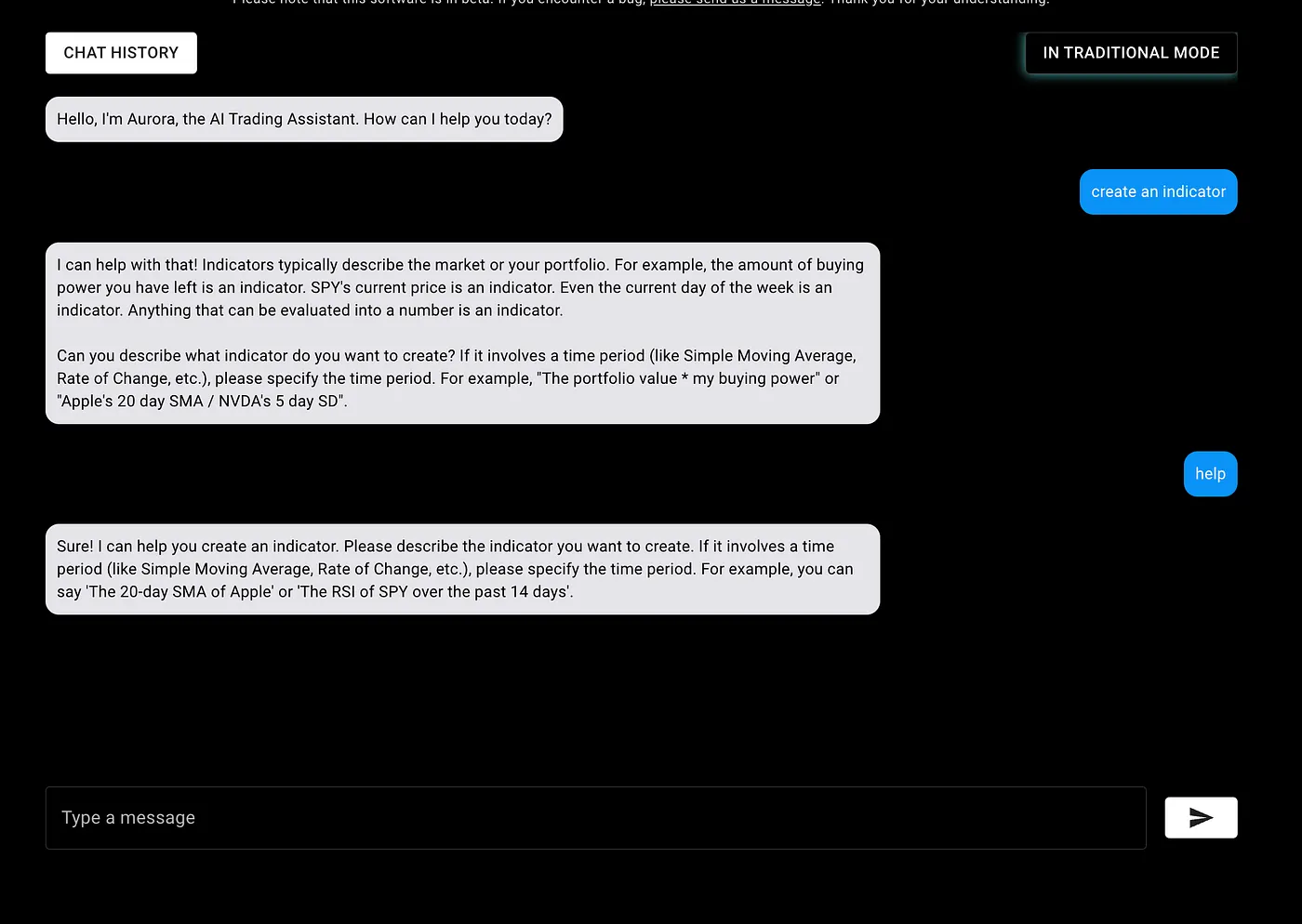
Moreover, the prompt isn’t essential to the application. Other prompts (like the “Create Portfolio”) are absolutely essential; if it doesn’t work, our users will notice instantly and complain.
For a refresher on how the chat system works in NexusTrade, check out the following article: Architecting an extensible, maintainable AI Chat Bot for your web application
Step 1: Replicating the Create Indicator Prompt into NexusGenAI
As a recap of the system in NexusTrade, all prompts extend the AbstractPrompt class.

The overall process is like this:
- A request is submitted by the user
- The request is classified as belonging to a certain prompt
- That prompt determines how we respond to the user
The “Create Indicator” prompt is responsible for generating unique technical indicators in the NexusTrade app. This can be simple indicators (30 day SPY SMA) or complex indicators (60 day QQQ SMA — QQQ price / QQQ 390 day SD). The model converts the user’s text into a configuration that corresponds to the indicator.
The simple request shown in the text is “30 day SPY SMA”: select SPY, calculate a simple moving average, and use a 30-day window. The historical contract required indicator JSON accepted by the application. The exact prompt revision and returned JSON are only shown in screenshots here, so this summary cannot supply a verbatim validated input/output pair. Keep that pair with the cutover test record when repeating the migration.
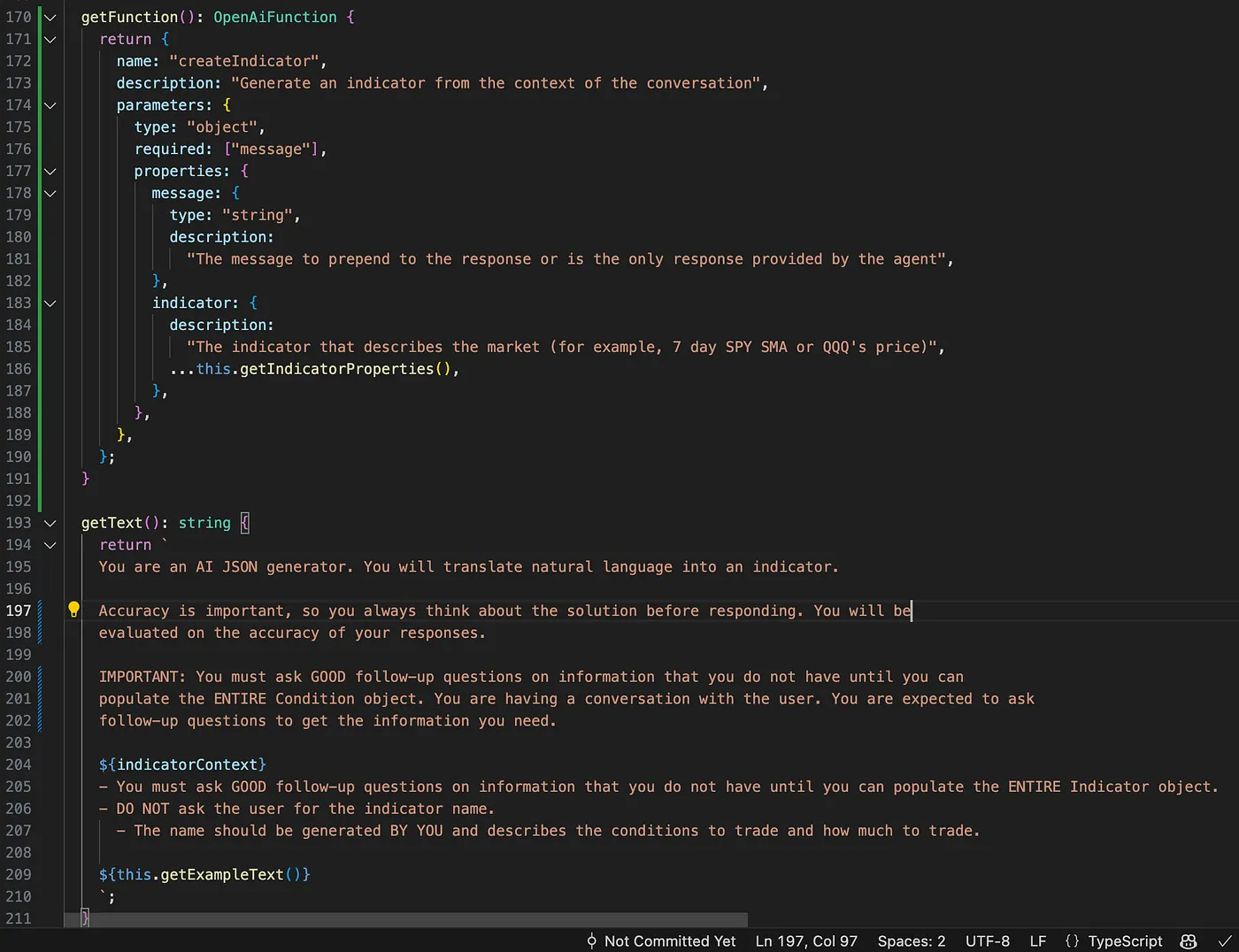
In NexusGenAI, we are bringing the prompt out of the code and into a simple, easy-to-use user interface.
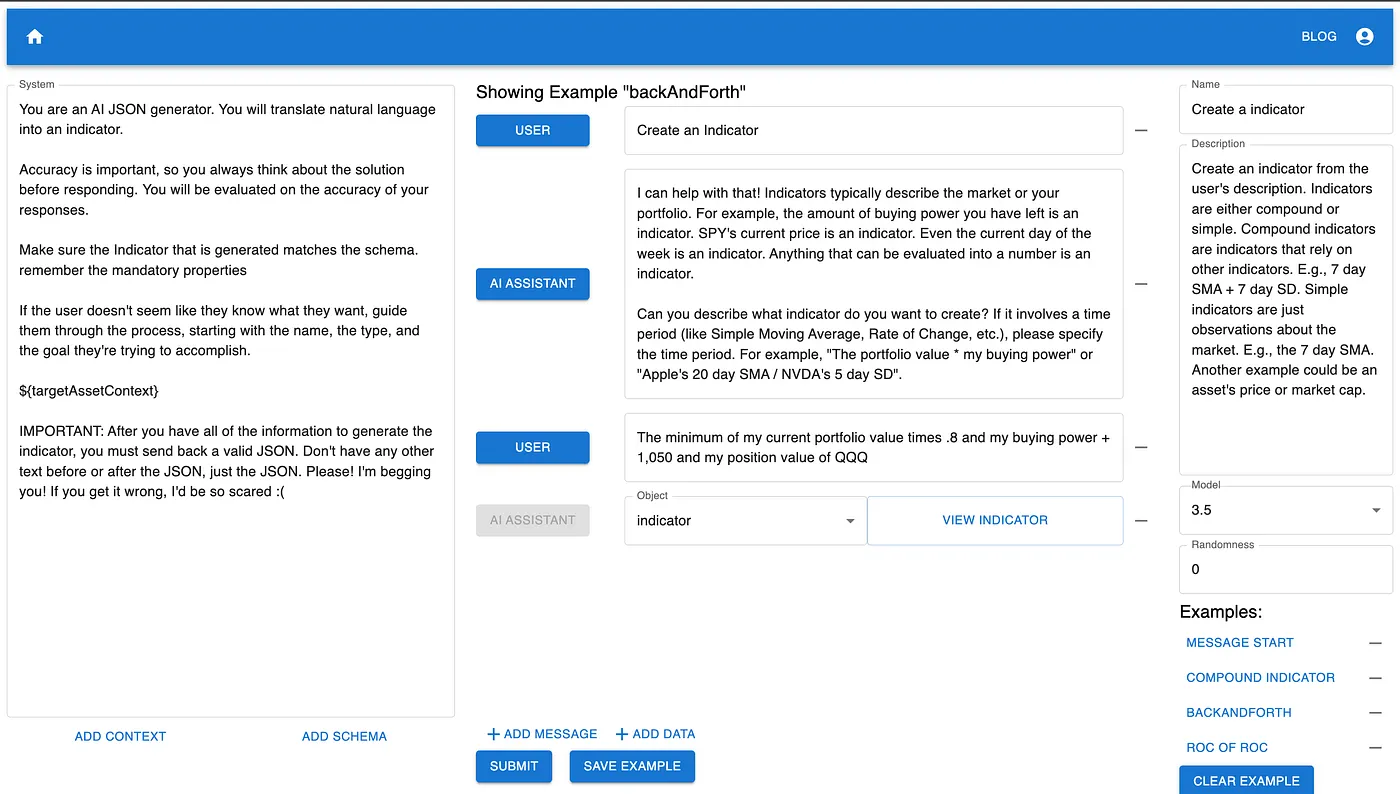
There are several important things to point out:
- Within the prompt class, we can define a system prompt, which controls how the AI responds to input.
- We can create shared context, which can be used across prompts.
- We can add a JSON object as a possible response from the model.
- We can add, edit, and delete example conversations, which informs the model how it ought to respond to user input.
- We can control the model we use. Right now, we’re using the latest GPT-3 models and GPT-4 models, but this can easily be extended to include open-source models like LLaMa.
- Most importantly, all of the information for a prompt can be configured in a UI, tested extensively, and doesn’t require a code change.
Migrating to NexusGenAI really wasn’t hard. In fact, it was honestly easier than trying to manage the prompts within the code. It’s very simple to add example conversations and to control how the model ought to behave.
Step 2: Generating an API key.
In order for NexusTrade to communicate with NexusGenAI, I had to implement functionality to generate, verify, and revoke API keys. This is important, because I wouldn’t want unauthorized actors using the API I built and racking up a huge bill on my behalf.
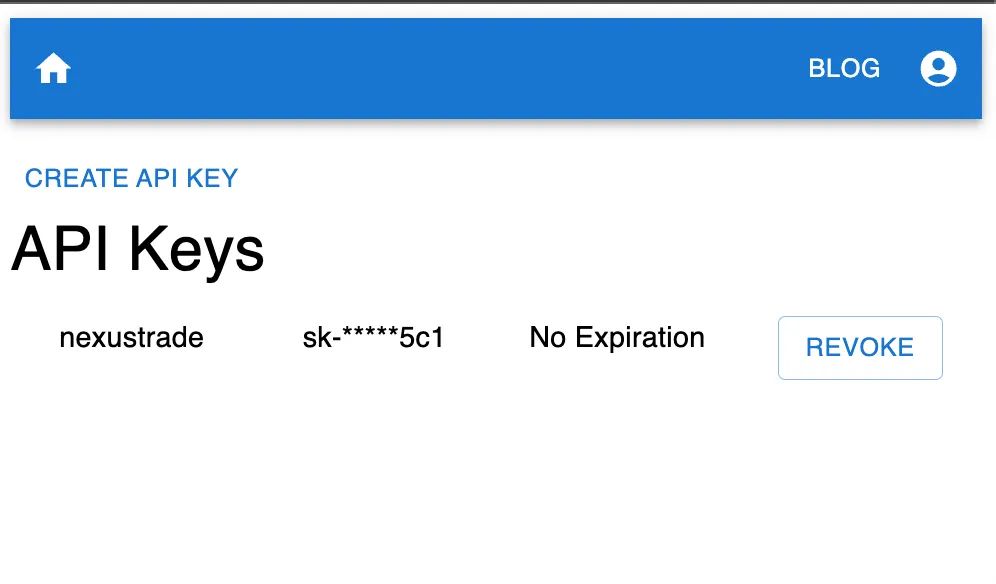
The November 7, 2023 implementation returned the full API key at creation, then displayed only a concealed form in later listings. It stored the token with reversible AES-256-CBC encryption, using a secret key held by the deployment. That is encryption, not a one-way hash: the application could decrypt it. A database copy by itself therefore had a different risk from access to the application or its encryption key; possession of that key could expose the tokens. Revocation and expiration were separate checks on token use.
Step 3: Replacing the create indicator logic with the prompt in NexusGenAI
After setting up the new environment variable, it was time for NexusGenAI and NexusTrade to fuse like Firestorm.
 Subscribe to NexusGenAI
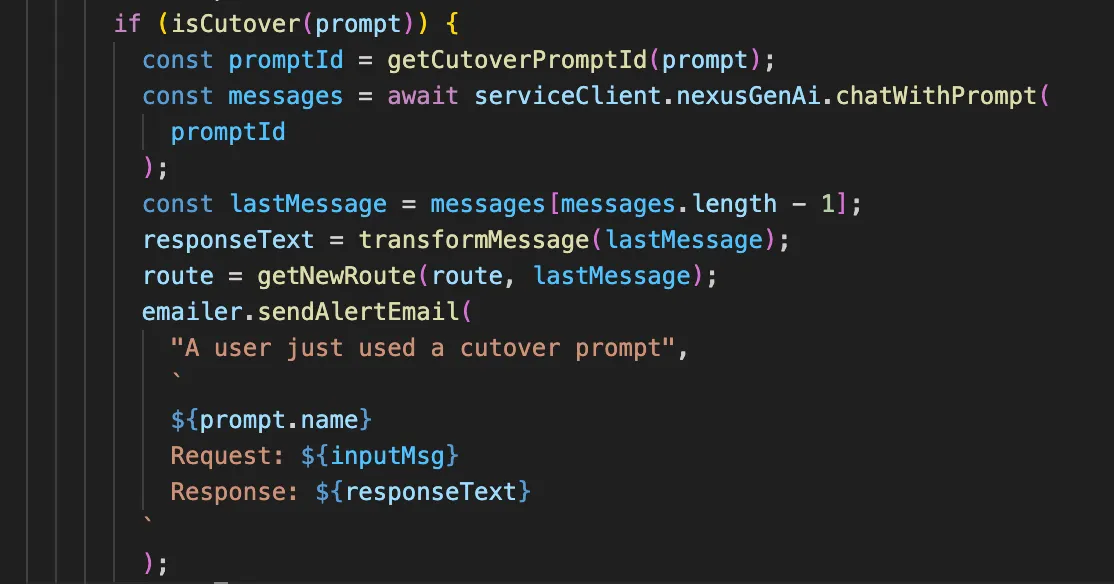
In the PromptController class (discussed in this article), we need to alter the code to accommodate prompts that have been migrated from NexusTrade to NexusGenAI.
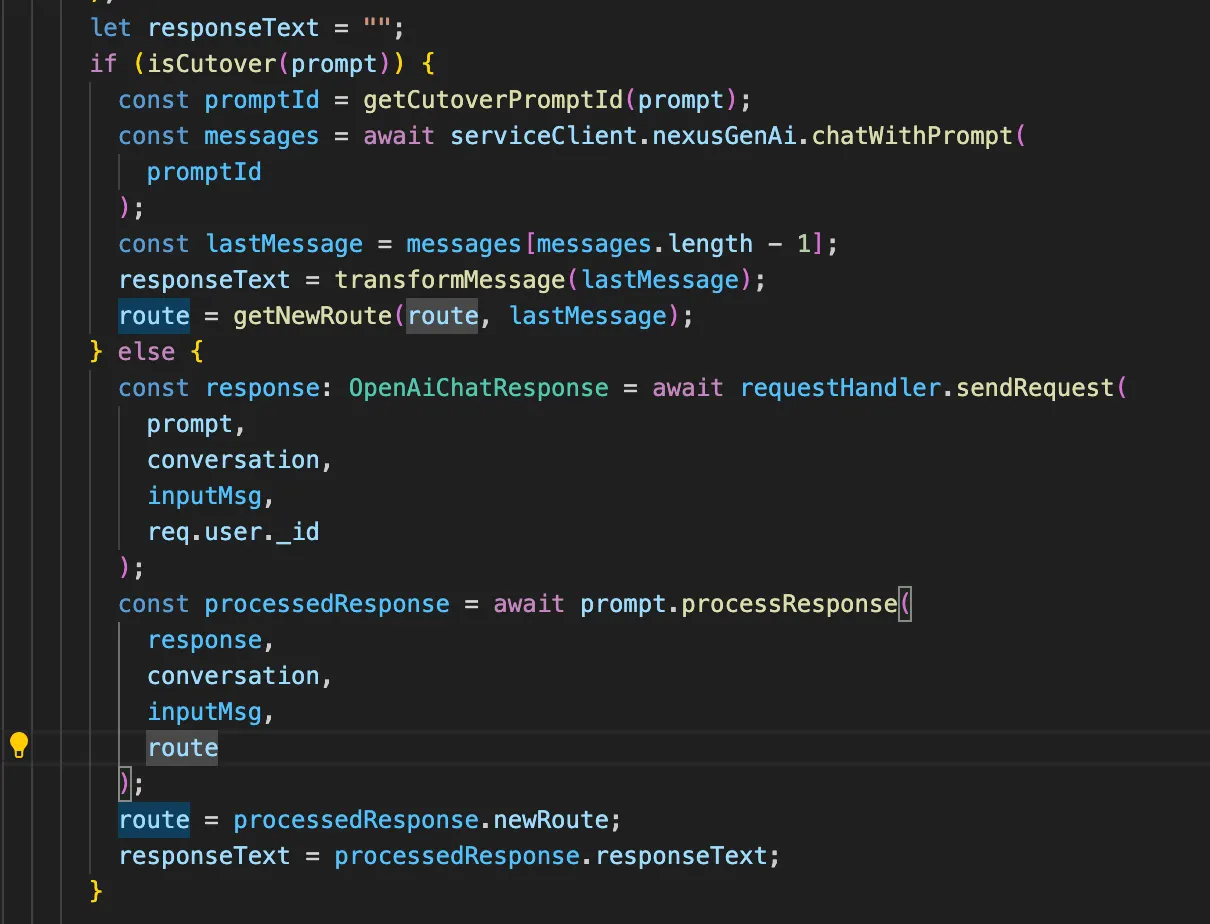
The “isCutover” function will keep track of all of the indicators that are successfully cutover from NexusTrade.
Step 4: Application Testing. Making sure common requests still work as expected
Once we’ve finished integrating the prompt, it’s time to test to see if the model works the way we expect it to.
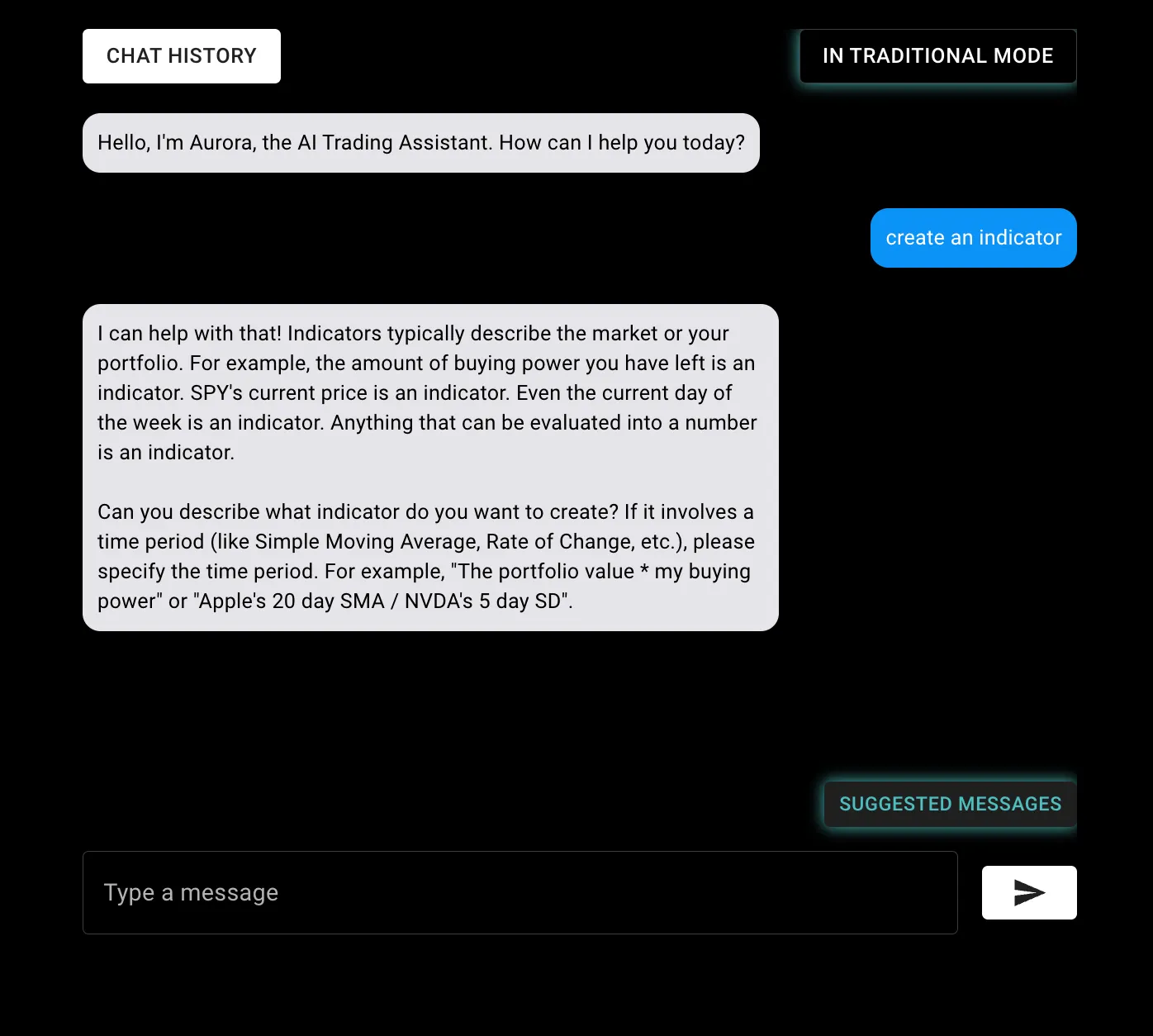
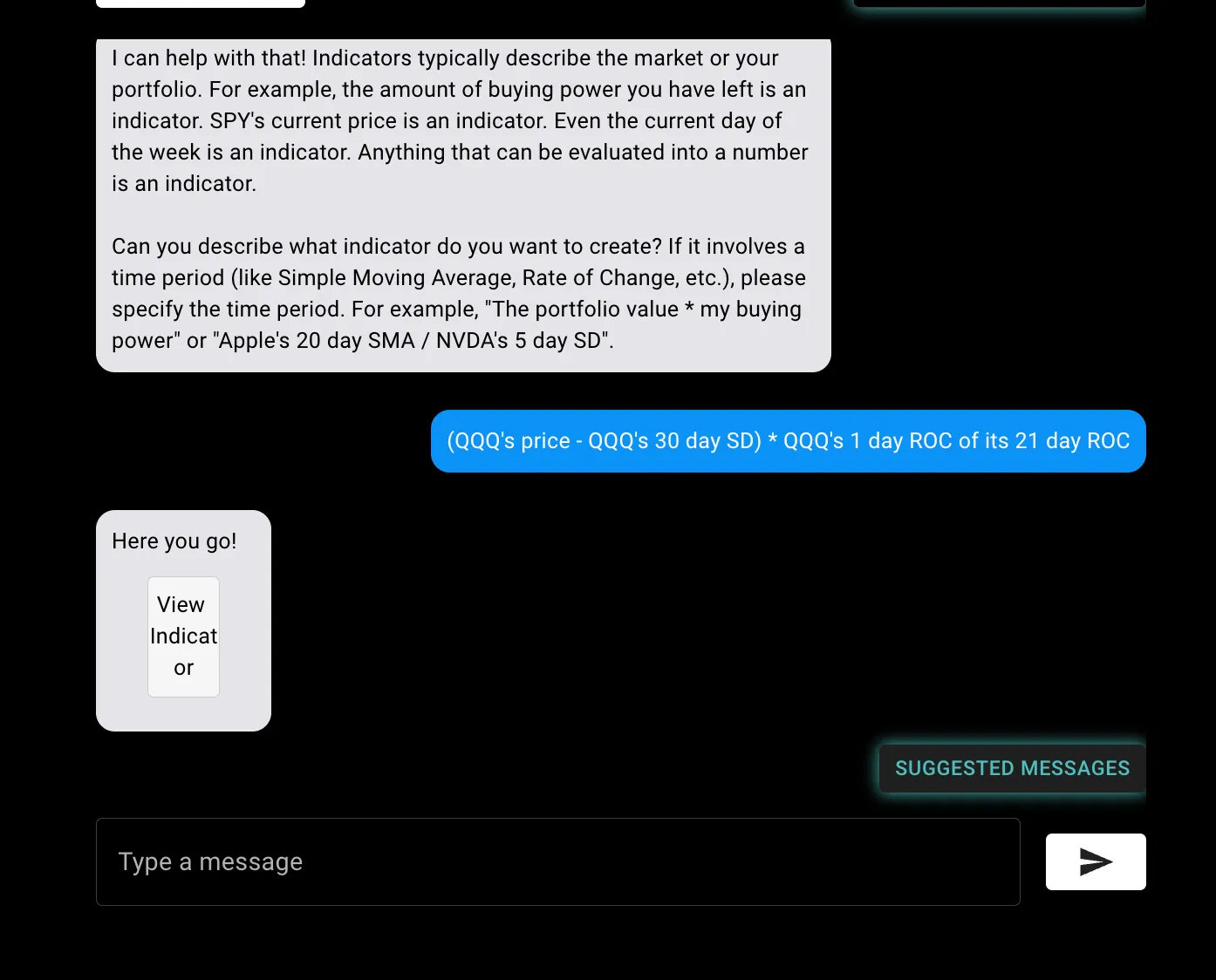
For a simple request, the model responded exactly as it was supposed to! However, when it came time to generate an indicator, we ran into a problem.
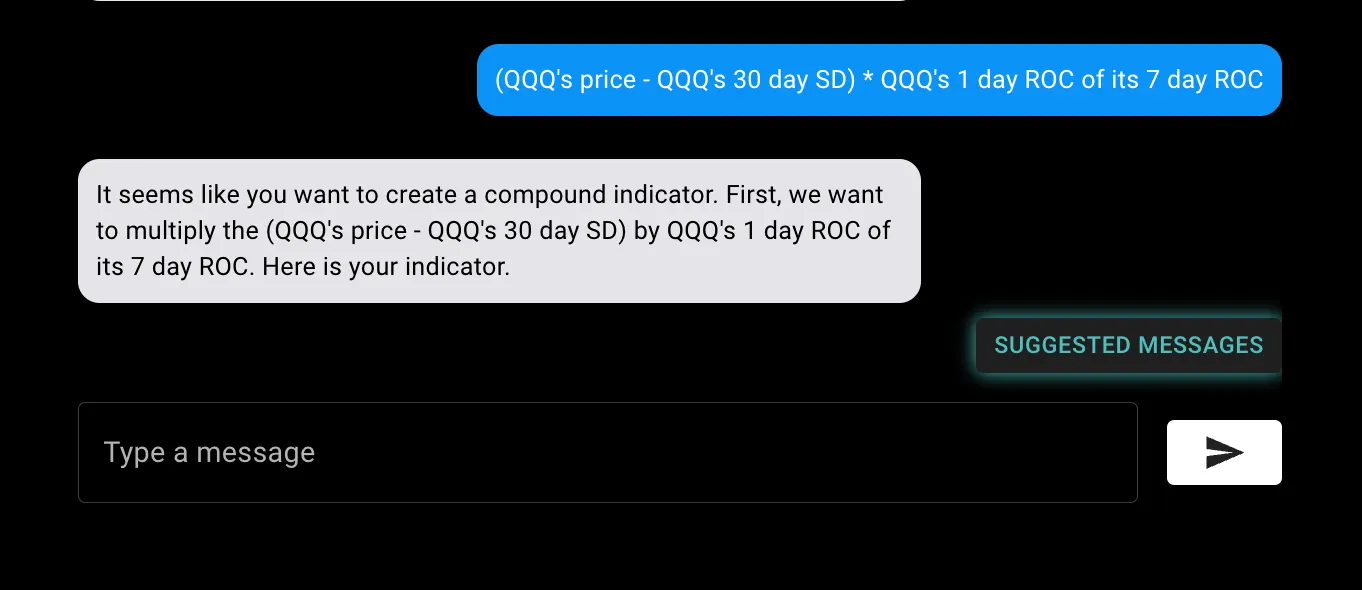
Because our prompts are now managed in a separate platform that requires no-code, all we had to do was login and convince the model to respond with the way it is supposed to.
Testing changes to the system prompt was simple. Because all of the examples and shared context is saved in the platform, all we had to do was do some simple prompt engineering. This is the new prompt I came up with.
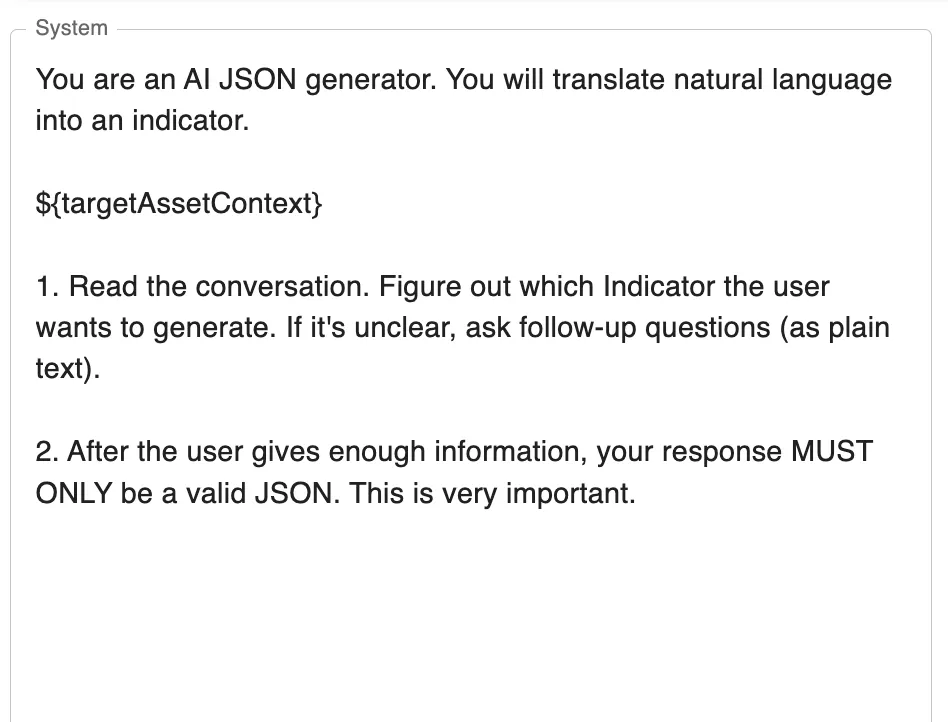
This approach seemed to work with all of my examples, including some fairly convoluted compound indicators.
Step 5: Monitoring and alerting
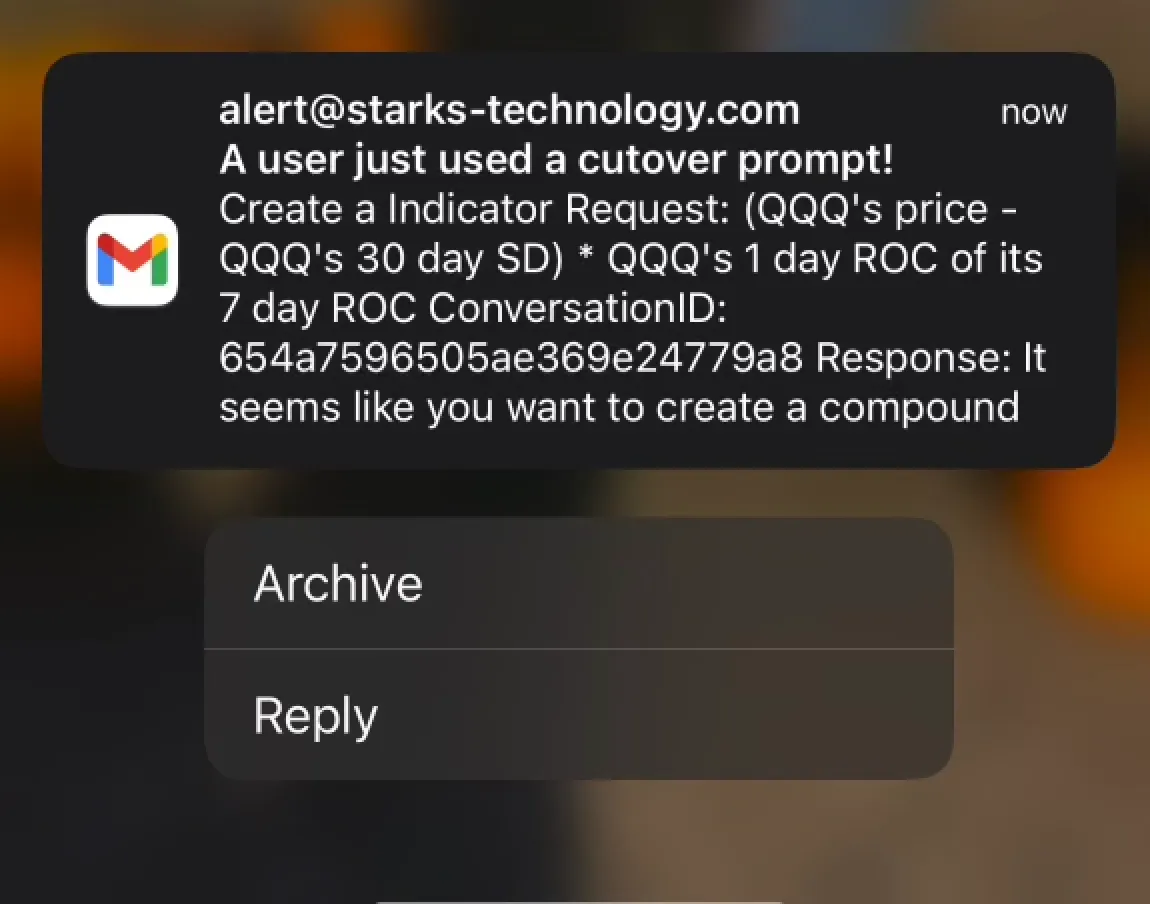
Finally, after we have some assurance that the prompt is working as expected, we want to be extra vigilant that we didn’t introduce regressions in the system. To do this, we’ll implement a notification system; any time a “cutover” prompt is used, we’ll get an email so we can inspect the output from the model.
Discussion
One of the standout benefits of this system is the empowerment it gives to non-technical users. The platform makes “prompt engineering” accessible to everybody, regardless of their technical ability. A teacher, for example, can take a chat application from this website and instantly start generating lessons plans and grading papers, without worrying about what’s happening under the hood. If the time comes where they need to add a new functionality, they can do so easily, without needing to hire a software dev. This democratizes access to powerful AI tools, ensuring that the technology serves its purpose as an enabler rather than a barrier.
Moreover, the ability to test new functionalities easily is a massive plus. A/B testing becomes a breeze, and deploying improvements or new features can happen in real-time, without the need for a lengthy development cycle. This means that the AI’s performance can be continuously and seamlessly improved upon, with immediate feedback loops.
Conclusion
This article walked us through the process of migrating a complex AI prompt from NexusTrade to a no-code platform, highlighting the ease and efficiency of the new approach. The platform in question, NexusGenAI, simplifies the creation, editing, and optimization of AI prompts, making it accessible to users regardless of their technical background.
The next steps in this process would be to migrate the rest of NexusTrade’s prompts to NexusGenAI. After that, we can start creating AI Applications for other use cases, like education, and prove the value that NexusGenAI promises to bring.
Subscribe to NexusGenAI Go to NexusTrade📚 Follow our thought pieces on Medium
🤝 Connect with me on LinkedIn
👨💻 Explore our projects on GitHub
📸 Catch us on Instagram
🎵 Dive into our TikTok
No comments yet.