Pssst, Trader! The original story is on Medium! Please clap 50 times to increase the engagement and share the article with your friends.
|
Early this year, a new technology suddenly merged into our consciousness. “Artificial intelligence” became all of the rage, and software engineers everywhere scrambled to find new use cases that could be solved with generative AI.
I was one of those engineers. After winning Leader’s Choice at my company’s AI-themed Hackathon, I sought AI-use cases within my own personal project — an automated trading platform.
You can read about the initial implementation of the AI-Chat here. To summarize, the AI Chat made it possible to create sophisticated trading strategies in seconds, and sped up the configuration of complex strategies by over 1000%. People were ecstatic about the idea of creating strategies in a straightforward manner. So what was the problem?
|
Not all Peaches and Roses
While the AI Chat was far beyond what I initially thought was possible, there were still some glaring problems. For one, it was extremely hard to create and update prompts.
|
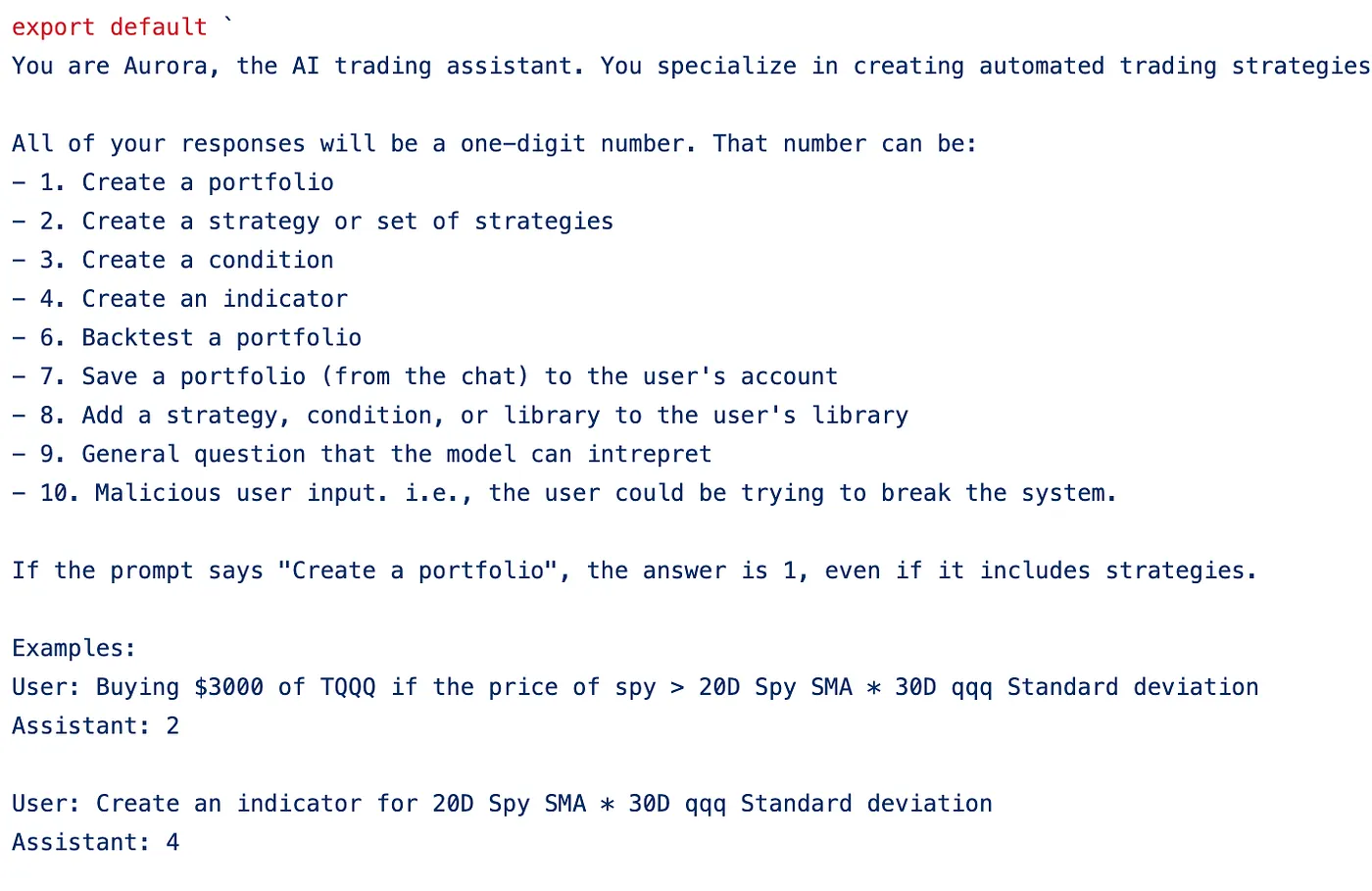
The “Prompt Controller” which classified requests into a number. This is needed to feed in the correct system prompt for the request.
|
All of my system prompts were hardcoded strings directly from the OpenAI playground. This meant that in order to create new examples, I had to copy/paste a bunch of text in order to add new examples. This was error prone, especially when creating new JSON generation prompts.
Additionally, it was very hard to process the responses from OpenAI. Each prompt had different processing steps after fetching the response, and I used a bunch of if-statements to keep track of this. This made the code nearly impossible to read.
Finally, due to the way the code was initially setup, it was almost impossible to add in Function Calling into this system. For these reasons, a complete architectural overhaul was needed.
|
An Architectural Nightmare. How do we wake up?
|
When I first set out to create my AI Chat, there were absolutely no technical guides on how to make the process easier. My goal was to see if what I wanted to do was even possible. After proving it was, I coded myself up against a wall, with an architecture that was difficult to extend, impossible to maintain, and challenging to even read. I went back to the drawing board.
We will start with a list of requirements for my AI Chat bot. We’ll then architect a solution that’s easy to extend, simple to add more context, and possible to maintain for the long-term.
To be concrete, here were my system requirements:
- When sending a request to the AI Chat, the request can be about any number of things. The response from the AI should be different depending on the request. For example, a request message that says “What is NexusTrade?” demands a different response than “Generate a portfolio for me”.
- After fetching an initial response from OpenAI, that response may need to be processed in some way. Some processing steps may involve additional requests to OpenAI. Other processing steps may involve taking actions within the application (for example, backtesting a portfolio or saving a strategy). Whatever the steps are, we should be able to do it within the architecture.
- More explicitly, this architecture should allow us to create “prompt chains”, where the output of one prompt is the input to another prompt.
- We should maintain the entire conversation history.
- We should be able to use the OpenAI Function-Calling API if we choose to.
Designing our better solution — The “AbstractPrompt”
To accomplish this task, I knew I needed to encapsulate all of the logic related to the “system prompt” into its own abstraction. This includes the processing steps for the response, and whether or not we’re using the OpenAI Function calling API. This is what I came up with.
|
interface ChatMessage {
user: string;
content: string;
timestamp?: Date;
}
interface Conversation {
id?: Id;
messages: ChatMessage[];
}
interface Example {
conversation: Conversation;
}
abstract class AbstractPrompt {
abstract name: string;
abstract description: string;
abstract examples: Example[];
abstract getFunction(): OpenAiFunction | null;
abstract processResponse(
response: OpenAiChatResponse,
conversation: Conversation,
inputMsg: string
): Promise<string>;
abstract getText(): string;
public getExampleText(): string {
if (this.examples.length === 0) {
return "";
}
return (
`Conversation Example: ` +
this.examples
.map((example) => {
const conversation = example.conversation;
return conversation.messages
.map((message) => {
return `${message.user}: ${message.content}`;
})
.join("\n");
})
.join("\n\n====================================================\n\n")
);
}
}
|
With this new abstraction, we can start defining some concrete prompts. This is where you have creative freedom; you can define how you want your AI to respond to any request, without using fine-tuning or vector databases. You can do all of this with some pretty clever prompt engineering.
It’s simple. Create a list of prompts that extend the AbstractPrompt. Provide a description for the prompt, and create a list of example conversations. By doing this, you are controlling exactly how you expect the AI to respond to certain requests.
For example, instead of that hardcoded string pictured above, the new “Controller Prompt” now looks like:
|
class ControllerPrompt extends AbstractPrompt {
name: string = "Controller Prompt";
description = "Direct the request from the user to the correct prompt.";
examples: PromptExample[];
prompts: AbstractPrompt[];
constructor() {
super();
this.prompts = ALL_OTHER_PROMPTS
this.examples = this.generateExamples();
}
generateExamples(): PromptExample[] {
const examples: PromptExample[] = [];
this.prompts.forEach((prompt, index) => {
const promptExamples = [...prompt.examples];
for (let i = 0; i < NUM_EXAMPLES; i++) {
if (i > promptExamples.length - 1) {
break;
}
const example = promptExamples[i];
const conversation = _.cloneDeep(example.conversation);
conversation.messages.push({
user: "AI Assistant",
content: `${index + 1}`,
});
examples.push(new PromptExample(conversation));
}
});
return examples;
}s
async processResponse(response: OpenAiChatResponse) {
if (!response.choices[0].message.function_call) {
throw new Error("Response from API was empty.");
}
const json = JSON.parse(
response.choices[0].message.function_call.arguments
);
const value = json.value.toString();
return value;
}
getFunction(): OpenAiFunction {
return {
name: "getRoute",
description: "Classify the conversation into the correct prompt.",
parameters: {
type: "object",
required: ["value"],
properties: {
value: {
type: "integer",
description: "The number that corresponds to the correct prompt.",
},
},
},
};
}
getPromptDescriptionsText(): string {
return this.prompts
.map((prompt, index) => `${index + 1}. ${prompt.description}`)
.join("\n");
}
getText(): string {
return `
You are being used as a decision controller. You will take input
from the user and decide which action to take.
All of your responses will be a one-digit number. That number can be:
${this.getPromptDescriptionsText()}
The following are examples of some conversations.
${this.getExampleText()}
`;
}
}
|
Take a minute to think about how much more maintainable and extensible this new architecture is. If we want to add additional context for the model, we can write any arbitrary text in getText(). If we want to add more examples, we can create an “example” class. In comparison to using a hard-coded string from the OpenAI Playground, this is orders of magnitude easier to work with.
Most importantly, this new architecture satisfies our requirements. We can respond to any arbitrary message from the user and process the response uniquely. We can also create “Prompt Chains”, and use the output of one prompt as input to another prompt. This is incredible.
Using the new AbstractPrompt
|
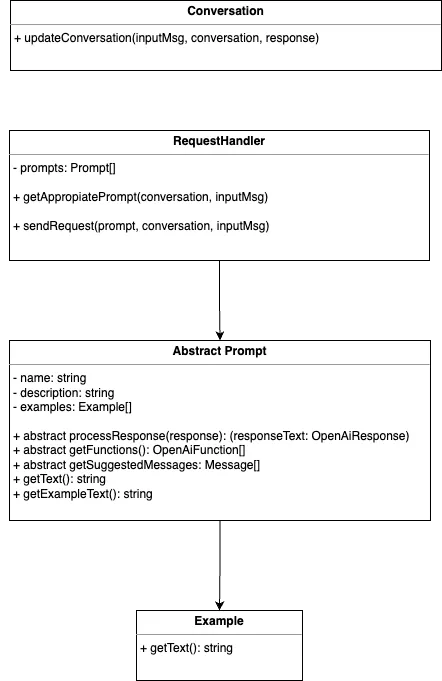
Class Diagram for the new architecture
|
With this new abstraction, I completely refactored my ChatController’s sendMessage function. We need to do these exact steps in sequence:
- Fetch the conversation (if any) using the conversation ID
- Take the message and classify it to the correct system prompt
- Send a request to OpenAI using the correct system prompt
- Process our response from OpenAI depending on which prompt we used
- Update the conversation and send the message back to the user
In code, this looks like the following:
|
class ChatController {
sendMessage = async (req: Request, res: Response) => {
try {
const inputMsg = req.body.message.content;
if (!inputMsg) {
return res.status(400).json({ message: "No message in request" });
}
const conversation = await Conversation.getConversation(
req.body.conversationId
);
const requestHandler = new RequestHandler();
const prompt : AbstractPrompt = await requestHandler.getAppropiatePrompt(
conversation,
inputMsg
);
const response: OpenAiChatResponse = await requestHandler.sendRequest(
prompt,
conversation,
inputMsg
);
const responseText = await prompt.processResponse(
response,
conversation,
inputMsg
);
await conversation.updateConversation(inputMsg, responseText);
res.status(200).json({
conversationId: conversation.id,
messages: conversation.messages,
});
} catch (e) {
res.status(500).json({ message: e.message });
}
};
};
|
A conversation with the AI Chat Bot
|
The newly architected AI Chat Bot is not just robust but is also extensible and maintainable. It facilitates a variety of operations, from simple dialogues to complex prompt chaining. The use of AbstractPrompt makes it incredibly easy to add new capabilities. The system is flexible enough to evolve with emerging needs, making it a long-term solution for integrating AI into web applications.
What started as an experimental project has now transformed into a system that can scale and adapt. The sky’s the limit when it comes to expanding its functionalities and refining its capabilities.
If you’re embarking on a similar journey, take these lessons to heart. Good architecture isn’t just about solving the problem at hand, but about building a system that can adapt to the problems of tomorrow.
Thanks for reading!
|
|

No comments yet.