Numerous AI startups exist, yet many offer little more than what ChatGPT Pro already provides. Businesses don’t need ad-hoc AI tools to solve their niche use-cases. They need to learn how to build complex workflows that utilizes AI.
Standing apart in this landscape, NexusGenAI distinguishes itself as one of the few AI solutions specifically designed to assist users in creating AI-driven workflows. Its user-friendly interface allows for the swift construction of workflows tailored to unique business requirements. In today’s demonstration, I will highlight its ease of use by examining the open-source platform, Ollama.
Ollama stands out as an exceptionally valuable open-source repository for AI-driven businesses. It enables the effortless execution of top-tier open-source models directly on local machines. Yet, Ollama has a significant limitation: its struggle with handling concurrent requests efficiently.
This article aims to explore potential solutions to this issue by delving into the Ollama repository through the lens of Retrieval-Augmented-Generation (RAG) technology.
Retrieval-Augmented Generation (RAG) is a sophisticated method for processing and analyzing documents, designed to enhance AI workflows significantly. This technique allows for the extraction of insights from documents that are not part of its original training dataset, and it functions in real-time. The process involves uploading a text document, segmenting it into smaller parts, and then storing these segments in a vector database. When a user makes a request, RAG retrieves the most relevant segments by conducting a similarity search. This method is highly effective in amplifying the capabilities of AI workflows, even surpassing the benefits of fine-tuning.
Despite its significance in the AI field, RAG remains a complex concept for those outside the domain, like teachers, lawyers, doctors, and students who may not have the necessary technical background. However, NexusGenAI bridges this gap, enabling these users to harness RAG’s capabilities for building complex workflows without requiring in-depth technical knowledge.
Analyze Documents Within Seconds ⏱️
Transforming documents into actionable insights with NexusGenAI is a straightforward process, involving just four simple steps:
Create a NexusGenAI Account: Start by setting up your account on NexusGenAI.
Upload Documents: Easily upload your documents through the user-friendly NexusGenAI interface.
Enable RAG Pipeline: Activate a Retrieval-Augmented Generation (RAG) pipeline with just a single click.
Interact with the Ollama GitHub Repository: Utilize the system to pose questions directly to the Ollama GitHub repository.
With NexusGenAI, you can upload an entire folder containing code to analyze using any AI model including Meta’s Llama 2, Microsoft’s Phi, or MixTral. You can also use the good ol’ fashion GPT-4, which is what I will be doing in this article.
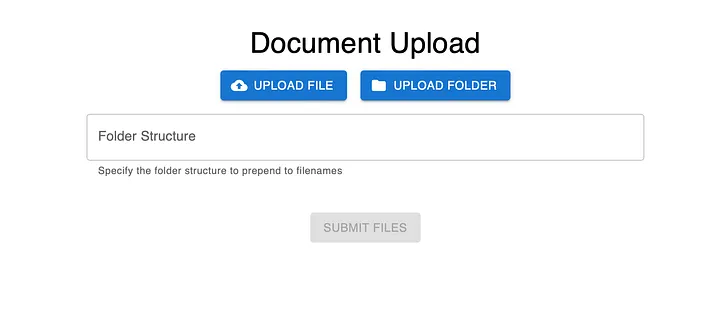
NexusGenAI UI For Uploading Documents
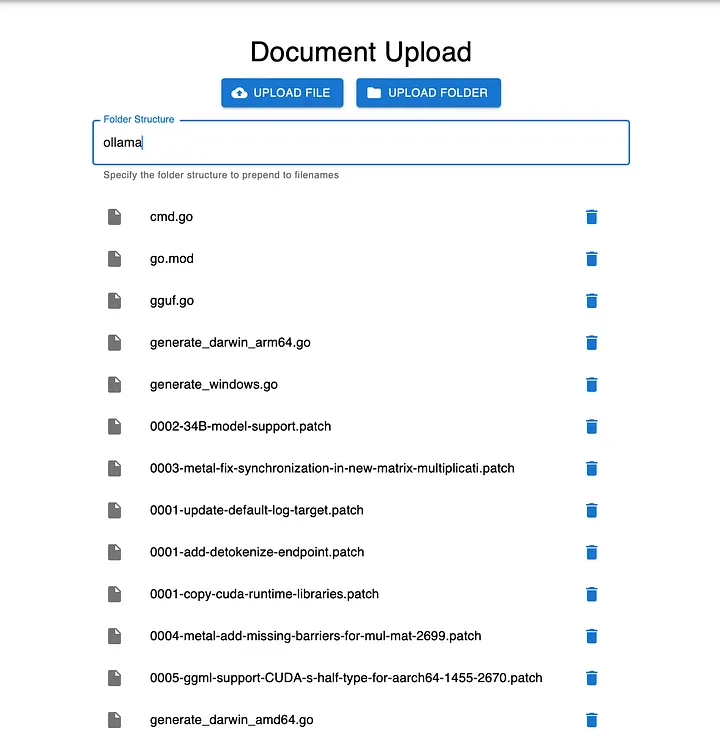
This interface simplifies document uploading, allowing users to upload either entire folders or individual documents with ease. For this demonstration, we will be focusing on uploading the Ollama repository.
All of the documents in the Ollama repo
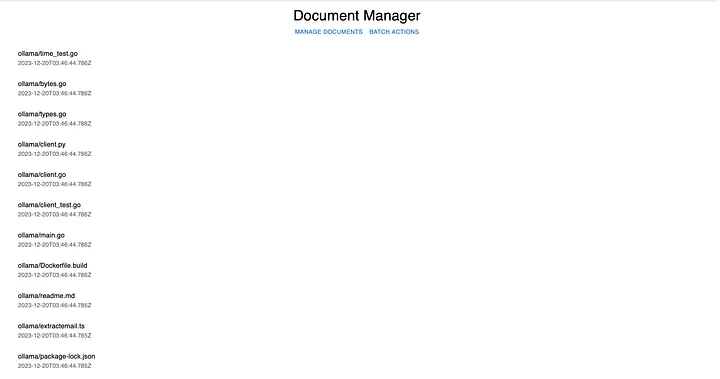
Once the documents are uploaded, users are automatically redirected to the Document Manager page. This page serves as a hub for managing and interacting with the uploaded content.
The Document Manager page
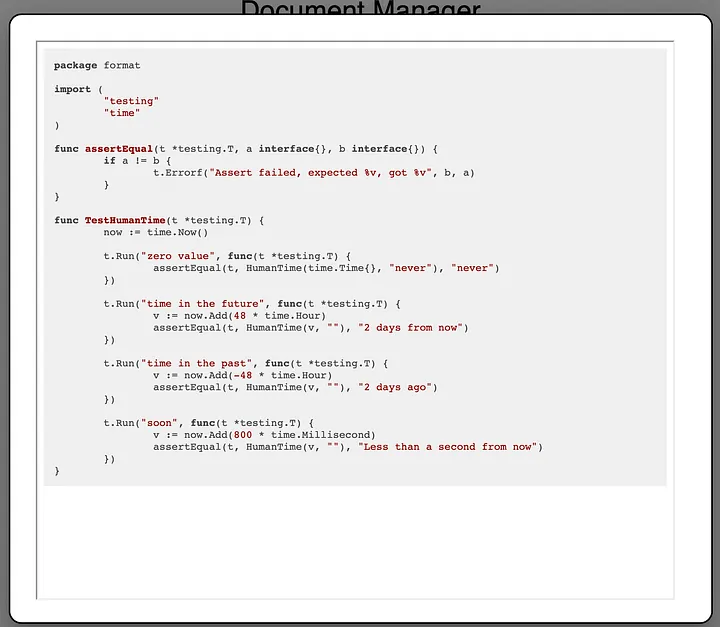
On the Document Manager page, users have the ability to view, segment (or ‘chunk’), summarize, or delete each individual document. This page offers a comprehensive suite of tools for efficient document management and analysis.
Viewing an individual document
Chunking a single document won’t suffice for crafting an AI workflow; we need to process all documents simultaneously. The key question then is: How can we achieve this simultaneous chunking of all documents?
One-Click RAG: Unveiling the Batch Actions Service! ✨
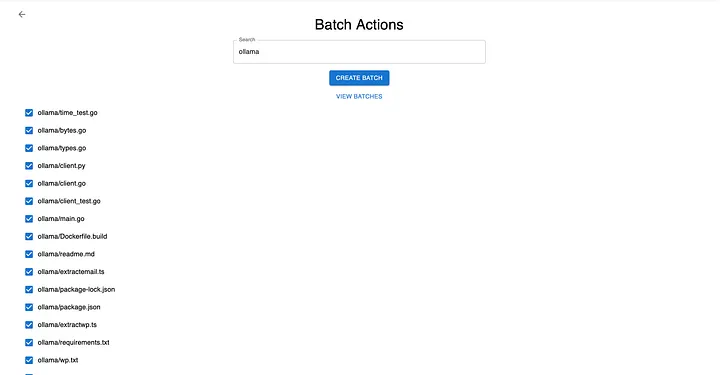
The Batch Actions Service is a game-changer, enabling users to efficiently handle multiple documents at once with ease. ✨ This service is not just about bulk processing; it also provides the ability to selectively query and process documents in various ways. Imagine the convenience of summarizing hundreds of internal documents simultaneously with just a single click. Here’s how it’s done.
Batch Actions allow you to do actions on a collection of documents at the same time
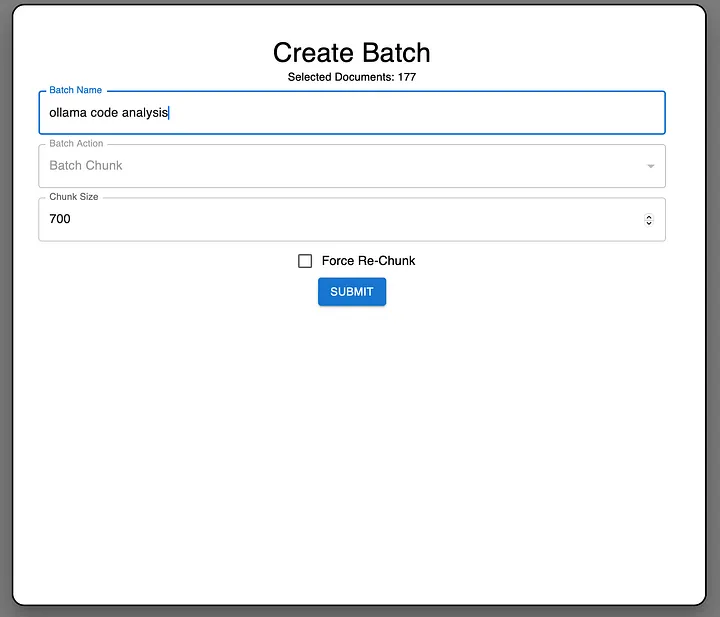
We’ll click “Create Batch” and we’ll give it a unique name. In this example, it will be “ollama code analysis”.
Creating a new batch in the batch actions service
We’ll proceed with the default chunk size of 700 and then click ‘Submit’. Approximately two minutes later, the user interface will display the following update.
Viewing the progress of the batch actions service
The Batch Actions Service has efficiently segmented all our documents in a matter of minutes. As non-technical users, we don’t need to delve into the backend complexities. Our primary focus is on the convenience and efficiency gained from automating a previously time-consuming workflow.
Interrogating a llama 🦙🕵️♂️
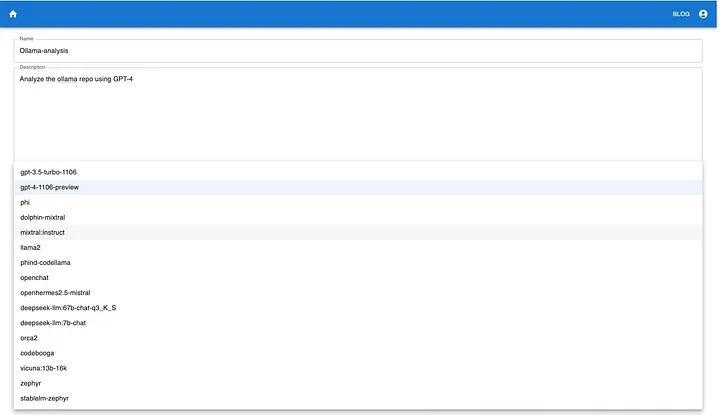
Next, we’ll navigate through the process of creating a new “prompt” within NexusGenAI.
In this step, users have the flexibility to choose between various open-source models and the OpenAI APIs, ensuring a wide range of options to suit different needs.
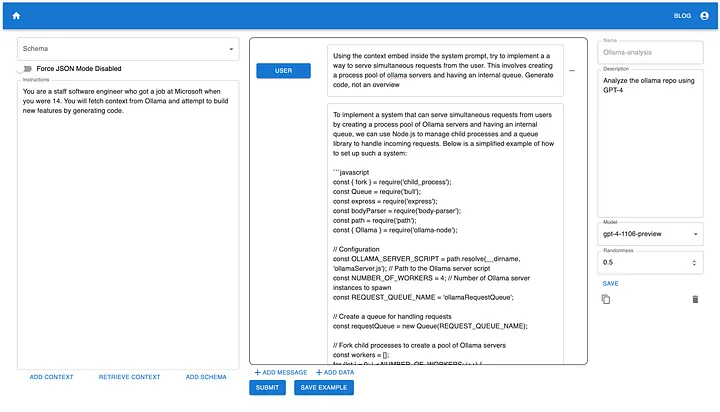
Once the prompt is created, we’ll set it as follows for the system:
You are a staff software engineer who got a job at Microsoft when you were 14. You will fetch context from Ollama and attempt to build new features by generating code.
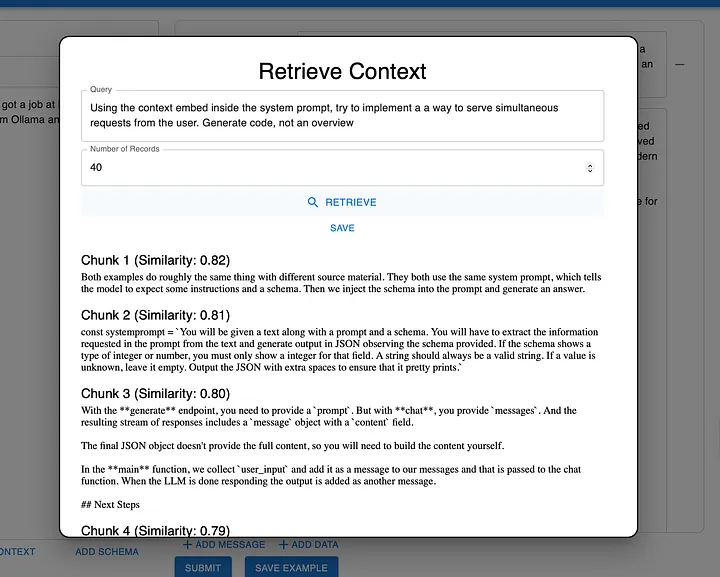
With this setup, we’re now ready to engage in retrieval-augmented-generation. To begin, we simply click on ‘Retrieve Context’ and input the query we intend to use.
The “Retrieval” step in Retrieval Augmented Generation
This interface showcases the core of the Retrieval-Augmented Generation process. Here, users can view the chunks of documents retrieved by the RAG Pipeline, complete with similarity scores. For our purpose, we embed the system prompt with the 40 most relevant document chunks. The model then generates its response based on this information.
Model Response with Relevant Code Snippets from the Ollama Repository
Remarkably, with minimal setup, the model successfully generates a JavaScript server capable of handling concurrent requests. While I haven’t personally tested the code, it appears that with some tuning, we could develop a server using Ollama to manage concurrent requests effectively. This result is truly impressive!
Summary and Conclusion 🌟
Retrieval Augmented Generation (RAG) and similar advanced techniques are pivotal in harnessing the full potential of AI. However, these complex methodologies often pose a challenge for non-technical users and programmers seeking straightforward solutions. They may lack the time or technical expertise to grasp these intricate technologies. NexusGenAI is designed to bridge this gap, making AI accessible to everybody, regardless of their technical background, and enabling the automation of complex workflows. A notable application of this technology is the advanced AI-Chat in NexusTrade, which has the capability to create and backtest investment portfolios and conduct extensive financial research.
We are at the threshold of a technological revolution driven by Artificial Intelligence and Large Language Models (LLMs). Those who embrace tools that automate and enhance their processes will significantly outpace those who do not. The critical question then becomes: which type of person will you choose to be in this evolving landscape?
Thanks for reading! Interested in learning how AI can be applied for your unique use case? Check out NexusGenAI. Want to see how AI can be applied to investing and trading? Create an account on NexusTrade today!


No comments yet.