I went through hell and back migrating to TimescaleDB. I didn’t last two weeks.
MongoDB vs TimescaleDB Performance: Real Benchmarks from a Trading Platform
 Austin Starks9 min readOct 3rd, 2025
Google “top 10 databases for time-series data”, and look at the top 10 links.
You won’t find MongoDB anywhere. As far as time-series databases go, it’s apparently not an option.
So when I was having performance problems with my historical backtest data, I assumed it was because it wasn’t “purpose-built”. I decided to throw the baby out with the bathwater, and undergo a crazy migration to TimescaleDB to make my app lightning fast and more scalable.
Two weeks into the trial, I returned to MongoDB and avoided the planned $590 monthly separate Timescale instance. The historical comparison below distinguishes that avoided bill from actual invoiced savings.
Here’s my story.
What is TimescaleDB and why did I migrate?
For context, I am a building the type of app that TimescaleDB was literally developed to support.
A lightning-fast algorithmic trading platform.
NexusTrade - No-Code Automated Trading and Research
Perform financial research and deploy algorithmic trading strategies
nexustrade.io
NexusTrade has features that requires a powerful time-series database including:
- An autonomous AI agent that will randomly launch a half-dozen backtests
- A ridiculously powerful genetic optimization engine that runs hundreds of backtests to create the perfect trading strategy
- A super-easy-to-toggle trading environment that lets you see how your strategies really perform (paper-trading) and launch them to the market for real (live-trading)
And with these features came some issues.
Atrociously slow query performance
With my trading platform, I had a huge issue.
My queries for time-series data was unfathomably slow.
Querying for a portfolio’s history could take 10 seconds or longer. Think about it; you opened the Robinhood app, you decide to see what your portfolio is at, and it shows a spinning icon for 1…2…3…
You’d delete the app before we got to 4.
And I did everything I could imagine. I added the right indices, studied documentation on aggregations. At some point, I was desperate enough to have a cron job to pre-populate the portfolio history of the most active users in Redis.
This obviously was not scalable.
Now, here’s a fact that’ll be important to the story later. I was using standard MongoDB collections. I thought I was “clever”, implementing my own specialized bucketing logic to try to speed up my queries.
But nothing worked. I looked for a solution and Timescale was there.
How I thought TimescaleDB would save me
I had first heard of TimescaleDB years ago, but I always ignored it until now.
TimescaleDB is an open-source time-series database written in C. It’s built for applications like sensor data, real-time analytics, and high-frequency trading platforms for storing and querying millions of rows with millisecond-level latency.
So obviously, it can handle a little old app like mine, right?
But since I was starting my new job at Coinbase and wanted my app to be fast, self-sufficient, and inexpensive, I thought hard about how I ought to refactor. I knew I wanted to significantly reduce my compute costs, and the database was a major part of this plan.
For context, I was spending over $400/month on MongoDB alone. This didn’t include the cost of Redis ($32/month) and the rest of my infrastructure. After a series of refactors to make my code faster and more efficient, my last order of business was the database.
I accidentally increased my backtesting speed by 99.9%. Here’s how.
100 Backtests in 300 Milliseconds. No, that’s not a typo.
medium.com
My plan was simple:
- Dual-write to MongoDB and TimescaleDB
- Migrate to TimescaleDB
- Schedule some brief downtime to shrink my Mongo instance
- Enjoy the sub millisecond queries I was promised
If only it went that smoothly.
Trudging through hell since day 1
After successfully migrating my database and turning my app back on, I was immediately greeted with lightning fast queries.
And multiple full-blown database crashes.
That’s right. Loading my app made my database run out of memory. 2CPUs, 8GB of RAM, and $295/month wasn’t enough, so I had to double it. Even then, the app was still unstable, but I knew I wouldn’t dare cough up a single penny more. I had to make some decisions.
- I significantly decreased the write frequency to every 5 minutes for history values
- I ran a migration to reduce the volume of data
- I turned on the advanced features like continuous aggregates and compression
And that worked… for a while. But it still wasn’t stable. The sub-second queries I was promised was over-shadowed by the myriad of error messages and random crashes. Many of which I was unprepared for.
For example.
The compression I dreamed about became my nightmare
Even when the database was put in a “stable” state, it still didn’t work like it should’ve. One error I kept getting was this.
[BacktestBatchWriter] Error inserting backtest history:
error returned from database: tuple decompression limit
exceeded by operation
I contacted TigerData support (who in all fairness, was some of the best technical support I’ve ever received from a company). They explained to me that the reason for this was my compression.
Because I was running 16+ concurrent backtests and they all inserted data into the database, the database was forced to de-compress many chunks to perform the insertion and make sure the uniqueness constraint wasn’t violated. Thus, my backtest batch writer was inserting WAY too much data at once.
There wasn’t a great way for me to get around this, other than turning off compression for backtests. For a time-series database that promised 90%+ data compression, this bummed me out, but it wasn’t a deal-breaker.
But then it got worse.
The continuous aggregates aggravated me to no end
Another core feature that I was promised was continuous aggregates. These are specialized little functions that convert your time-series data into pre-computed windows regularly. You can have minutely data for the last week, hourly data for the past month, and daily data for the past year. Doing this in Mongo required a combination of cron jobs and deletion scripts, while with Postgres, it came with the db out-of-the-box.
What could possibly go wrong!
Everything.
My configured continuous-aggregate refresh path did not suit backtests that generated historical data in bulk and needed results immediately. The data was ready before the refreshed view; manually refreshing after concurrent runs caused unacceptable waits in my setup. This is an implementation and workload result, not a prohibition on aggregates for every backtesting system.
Like at all.
Let me explain why. Continuous aggregates are mostly used so that distant data is transformed into a view where its cheaper to query. A function runs in the background when the database is idle, locks the data, and generates the aggregates.
For my repeated backtest-refresh workload, this continuous-aggregate refresh path did not deliver the behavior I needed. That is the workload limitation described here.
For backtesting data, even though it’s time-series data, you generate all of the historical points at the same exact time. Thus, when you view the results a few seconds later, no aggregates were created.
To get around this, you could manually create aggregates after each backtest. Claude suggested this to me, and I thought it was smart! So I implemented it, tested it, and shipped it to prod.
And crashed my database yet again.
In my implementation, manually refreshing aggregates after several concurrent backtests produced waits that delayed viewing history to a minute or longer. I attributed those waits to locking, but this article does not provide a lock trace establishing that the entire database was locked. I disabled that refresh path to restore usable result viewing.
So then I had to completely disable that too.
What’s more? I was paying a lot more for the luxury of misery
Eventually, I got to a point where everything finally worked. I had my fast reads, decent writes, no more error messages in the logs. But the anxiety never left my mind on what a crummy experience I was having.
What was worse was that I would soon have to pay for the luxury.
To be reliable for my concurrent backtests and live-trading, I needed 4 CPUs and 16GB of RAM. After my free trial expires, this would’ve cost me $590/month. I could’ve downgraded, but knew that I would be one viral Medium post away from taking down the database again.
This thought tormented me.
Finally, I thought deeply. My old caching solution would’ve been a lot cheaper than this, and it worked! I said fuck it, and did the painful migration back to MongoDB.
Only this time, I was smart about it.
Reverting back to MongoDB, and accidentally getting a faster solution
While creating the collections in MongoDB Compass, I saw an interesting option that I hadn’t used before.
Time-series collections.
In fairness to me, I’ve been using Mongo for half a decade. I started this project in late 2020, while I was a junior engineer, and I didn’t know MongoDB really had time-series collections.
Well I knew, but I didn’t know, y’know?
When I looked up MongoDB time-series database, I really didn’t find much at all. No hard numbers. No comparisons. Just blog posts (from the MongoDB team) that said it was great for time-series data.
Because I was migrating back, I compared the implementations using the benchmark script described below. Their outputs differ, so the reported timing and storage figures describe those workloads rather than an apples-to-apples database result.
GitHub - austin-starks/MongoDB-vs-Timescale-DB: A script to benchmark MongoDB vs Timescale DB for…
A script to benchmark MongoDB vs Timescale DB for Backtesting and Portfolio Charting …
github.com
And wow. MongoDB needs a MUCH better marketing team.
Better in nearly every single way
When I say that I was shocked seeing these results, I can’t emphasize the magnitude. I mean, even if cost wasn’t a factor, MongoDB did VERY good. But accounting for the fact that I would no longer need an external database, the difference was mind-blowing.
Here’s how I compared them.
I created a script that tests these databases in terms of concurrent query performance, data size and cost. I then ran it to see how much slower my database would be from this “downgrade”.
The answer is not at all.
Here’s a table summarizing the key findings. You can find the full findings, including queries ran and the benchmark script here.
The repository records a useful workload comparison, with a limit: the documented backtest queries return different row and embedded-position counts. Treat its latency figures as results for those implementations, not a controlled equal-output database ranking.
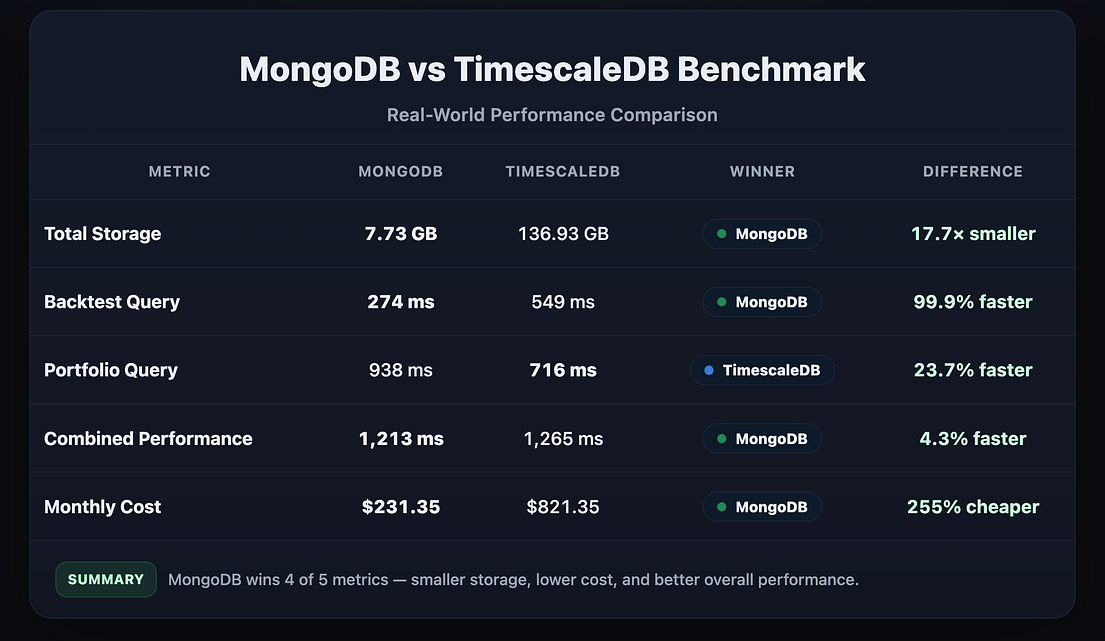
The key findings were:
- For backtests, MongoDB time-series database was 2x faster than TimescaleDb ⚡
- MongoDB’s columnar compression caused the data to be nearly 18x smaller than TimescaleDB! 137 GB turned into 7.73! 😱
- MongoDB was essentially free, since I’m already using it as an operational database. Timescale DB would’ve been $250-$600+ per month! 💀
The only thing that Timescale beat Mongo on decisively was that portfolio history queries were 24% faster on average. However, the queries were still under 1 second on average and are cached when the user logs in. I genuinely don’t think people could notice.
And this analysis doesn’t even account for the intangibles, like learning the “best” query patterns for the data, supporting another database, and figuring out which data I’m “allowed” to compress.
It doesn’t account for upgrading to the premium TigerData plan for priority support, or the potential reputational harm if my production database continued to crash.
The linked historical cost comparison is $821.35 for the combined operational database plus separate time-series instance, versus $231.35 for MongoDB alone: a $590 planned instance avoided. It does not establish over $600 in actual monthly invoiced savings.
| Historical cost basis | Amount/month | Meaning |
|---|---|---|
| Original MongoDB bill described above | Over $400 | Earlier configuration; not the final baseline |
| Planned separate Timescale instance | $590 | 4 CPU/16GB after the trial |
| Final MongoDB figure in the linked benchmark | $231.35 | Historical all-in-one comparison |
| Combined MongoDB plus separate Timescale | $821.35 | $231.35 + $590 |
| Separate instance avoided | $590 | Avoided planned bill; not an invoiced before/after saving |
This was an unbelievable outcome.
The real lesson – just because a hammer is shiny doesn’t make it better at banging nails
This was one of my most painful experiences when it comes to my trading platform NexusTrade. Having to deal with a barrage of weird errors and poorly performing code was insanely stressful. I tried to make my system more stable and ended up crashing the database more times than I ever have in my life.
What a twist of irony.
But in truth, I’m not mad at all. This acted like a great forcing function to make my app genuinely better. My old solution wasn’t scalable and in less than a month, I ended up with a lightning-fast, inexpensive database that can support my needs for the long-term.
I also learned a valuable lesson. A shiny tool isn’t necessarily better at the job, but it can easily be more expensive. TimescaleDB has so much documentation and praise regarding continuous aggregates and columnar compression, and these ended up being some of the features that messed with me the most!
In the end, plain ol’ boring MongoDB with the updated time-series collections did a much better job. The compression is unbelievable, the speed is lightning fast, and the storage is less than a single save in my modded run of Skyrim.
In the end, I found what I was looking for right where I started — with MongoDB.
To reproduce the comparison, inspect the benchmark source and full results. Fix identical history and position rows, record versions, resources, indexes, compression and refresh state, then report returned counts with mean and tail latency. The original script uses 20 requests in batches of four. Keep warm/cold cache and immediately-viewed bulk backtests distinct.
AI Stock Trading Agent
Use a fully autonomous AI agent to perform financial research and create algorithmic trading strategies.
nexustrade.io
No comments yet.